Event Management System
Objective
The EMS aims to automate and streamline various aspects of event management, reducing manual tasks and optimizing the overall efficiency of organizing events. The project seeks to provide a straightforward and intuitive user registration process, allowing new users to sign up easily and become part of the event community. For existing users, the EMS empowers them to create new events efficiently through an intuitive interface, simplifying the event creation process and ensuring accurate event submissions. The EMS endeavors to enhance event discovery for attendees by implementing a robust event search functionality, enabling users to explore and discover specific events based on their preferences and interests. By providing a user-friendly platform, the EMS aims to enhance the overall event experience for both organizers and attendees, making event planning and participation a seamless and enjoyable process.
Abstract
NOTE: Without the concern of our team, please don't submit to the college. This Abstract varies based on student requirements.
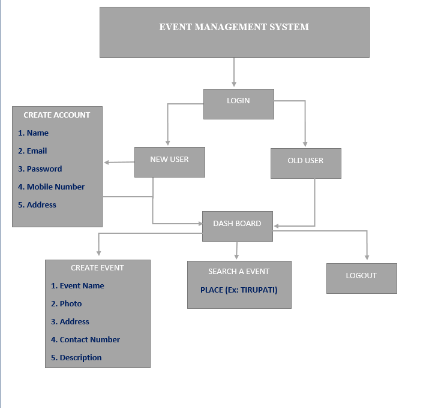
Block Diagram
Specifications
H/W CONFIGURATION:
Processor - I3/Intel Processor
Hard Disk - 160GB
Key Board - Standard Windows Keyboard
Mouse - Two or Three Button Mouse
Monitor - SVGA
RAM - 8GB
S/W CONFIGURATION:
• Operating System : Windows 7/8/10
• Server side Script : HTML, CSS, Bootstrap & JS
• Programming Language : Python
• Libraries : Flask, Pandas, MySQL. Connector, Os, Smtplib, NumPy
• IDE/Workbench : PyCharm
• Technology : Python 3.6+
• Server Deployment : Xampp Server
Learning Outcomes
User:
Register: User can able to register into the application with required details such as name, email, password, mobile number, and password)
Login: User can able to login to the application with email and password.
Create event: User can able to create event (with event details such as event name, photo, address, contact number, description)
Search event: User can able to search the events that are present in the application.
Logout: User can able to logout from the application after he completed all the process.


Related Projects
 Paper Publishing

Request Call Back
Would you like to receive a free callback now?
Choose the best time for callback:
Leave your message and we will contact you as soon as possible

6-2-85/B, Old Maternity Hospital Road, Thyagaraja Nagar, Tirupati, Andhra Pradesh – 517501
+91 9030333433
+91 9393939065
0877-2261612

Disclaimer - Takeoff Edu Group Projects are not associated or affiliated with IEEE in any way. The IEEE Projects mentioned here are mentioned in the context of student projects, whose ideas are derived from IEEE publications, not projects of or by IEEE.

