Wireless Digital Traffic Signs Of The Future
Also Available Domains Raspberry pi
Objective
The main objective of this project is to identify a traffic sign which is then wirelessly transmitted to a client receiver residing in the vehicle. The client device is usually a smart phone or a car heads-up display. It can also be displayed on a PC in a car using terminal software.
Abstract
Traffic signs have come a long way since the first automobile was invented. They have long served the purpose of warning and guiding drivers and also enforcing the traffic laws governing speed, parking, turns, and stopping.
In this project, we discuss the issues and challenges facing current traffic signs, and how it will evolve into a next-generation traffic sign architecture using advanced wireless communications technologies. Here we are using the Zigbee technology and Raspberry PI and software, we foresee that, in the future, digital traffic signposts will be capable of transmitting the traffic sign information wirelessly to road users, and this will transform our roads into intelligent roads, where signs will appear promptly and automatically on in-vehicle displays to alert the driver. There is no longer the need to watch out for traffic signs since the detection will be automatic and performed wirelessly. This transformation will lessen the burden on the drivers so that they can then focus more on the traffic ahead while driving. Also, this evolution into wireless digital sign posts will fit well with the vision of future smart cities, where smart transportation technologies will be present to transform how we drive and commute, yielding greater safety, ease, and assistance to drivers.
Keywords: Camera, Zigbee, 16x2 LCD, Raspberry Pi.
NOTE: Without the concern of our team, please don't submit to the college. This Abstract varies based on student requirements.
Block Diagram
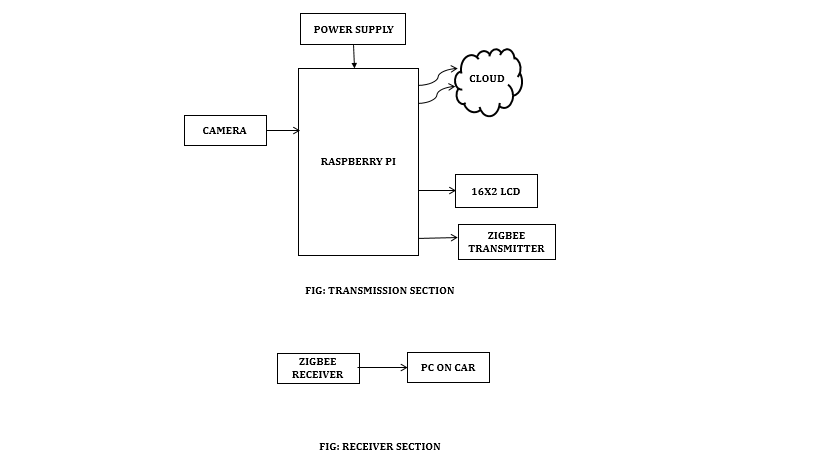
Specifications
Hardware Requirements:
- Raspberry Pi
- Micro SD card
- 5V Adapter
- LCD Display
- Camera
- Zigbee Module
Software Requirements:
- NOOBS software
- Python3 IDE
- VNC Viewer
- Fritzing
- Third Party server
Learning Outcomes
- Raspberry pi Pin diagram and Architecture
- Installation procedure for NOOBS software
- How to install python3 IDE Software
- Basic coding in python
- How to interface camera with Raspberry Pi?
- Introduction to serial communication
- Working of zigbee module
- How to interface zigbee module with Raspberry Pi?
- Working of 16x2 LCD
- How to interface LCD with Raspberry Pi?
- How to interface zigbee module with PC?
- Introduction to IOT
- IOT architecture and its scope
- How to send data from Raspberry Pi to a third party server?
- About Project Development Life Cycle:
- Planning and Requirement Gathering( software’s, Tools, Hardware components, etc.,)
- Schematic preparation
- Code development and debugging
- Hardware development and debugging
- Development of the Project and Output testing
- Practical exposure to:
- Hardware and software tools. ,
- Solution providing for real time problems,
- Working with team/ individual,
- Work on Creative ideas.
- Project development Skills
- Problem analyzing skills
- Problem solving skills
- Creativity and imaginary skills
- Programming skills
- Deployment
- Testing skills
- Debugging skills
- Project presentation skills
- Thesis writing skills


 Paper Publishing

Request Call Back
Would you like to receive a free callback now?
Choose the best time for callback:
Leave your message and we will contact you as soon as possible

6-2-85/B, Old Maternity Hospital Road, Thyagaraja Nagar, Tirupati, Andhra Pradesh – 517501
+91 9030333433
+91 9393939065
0877-2261612

Disclaimer - Takeoff Edu Group Projects are not associated or affiliated with IEEE in any way. The IEEE Projects mentioned here are mentioned in the context of student projects, whose ideas are derived from IEEE publications, not projects of or by IEEE.

