WiRa: Enabling Cross-Technology Communication from WiFi to LoRa with IEEE 802.11ax
Objective
The objective of this study is to propose the WiRa protocol, enabling efficient Cross-Technology Communication (CTC) between WiFi (IEEE 802.11ax) and LoRa by simulating LoRa waveforms using 802.11ax's OFDMA, improving data transfer efficiency.
Abstract
An developing method called Cross-Technology Communication (CTC) allows incompatible wireless technologies to be directly connected to one another. Current research suggests CTC from IEEE 802.11b to LoRa, but because of their wildly unequal data speeds, it is not very efficient. In order to achieve an efficient CTC from WiFi to LoRa, we propose in this study a WiRa protocol that uses IEEE 802.11ax to simulate LoRa waveforms. WiRa can simulate LoRa chirps using just one Resource Unit (RU) by utilizing 802.11ax's OFDMA, freeing up additional RUs for higher-rate WiFi users. In order to prevent emulation errors, WiRa carefully chooses the RU and uses WiFi frame aggregation to mimic the lengthy LoRa frame. We suggest using a subframe header mapping technique to recognize and eliminate incorrect symbols brought on by immovable subframe headers within the compiled frame. We also suggest a mode-flipping approach to address Cyclic Prefix mistakes, predicated on our discovery that distinct CP modes have disparate, even diametrically opposed effects on the emulation of a given LoRa symbol. Using a common LoRa device and the USRP platform, we deploy a WiRa prototype. Extensive testing show that WiRa can transmit full LoRa frames at a rate of 40.037 kbps while maintaining a symbol error rate (SER) below 0.1.
Keywords— Cross-Technology Communication (CTC), IEEE 802.11b, OFDMA, WiRa, LoRa.
NOTE: Without the concern of our team, please don't submit to the college. This Abstract varies based on student requirements.
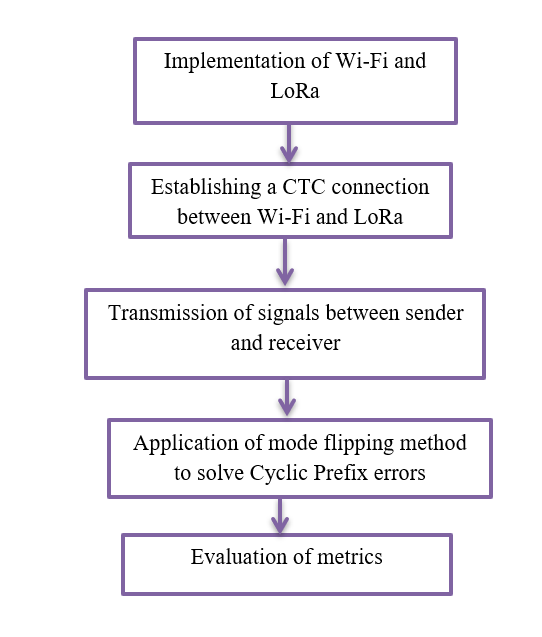
Block Diagram
Specifications
Software: Matlab 2020a or above
Hardware:
Operating Systems:
- Windows 10
- Windows 7 Service Pack 1
- Windows Server 2019
- Windows Server 2016
Processors:
Minimum: Any Intel or AMD x86-64 processor
Recommended: Any Intel or AMD x86-64 processor with four logical cores and AVX2 instruction set support
Disk:
Minimum: 2.9 GB of HDD space for MATLAB only, 5-8 GB for a typical installation
Recommended: An SSD is recommended A full installation of all MathWorks products may take up to 29 GB of disk space
RAM:
Minimum: 4 GB
Recommended: 8 GB
Learning Outcomes
· Introduction to Matlab
· What is EISPACK & LINPACK
· How to start with MATLAB
· About Matlab language
· Matlab coding skills
· About tools & libraries
· Application Program Interface in Matlab
· About Matlab desktop
· How to use Matlab editor to create M-Files
· Features of Matlab
· Basics on Matlab
· What is Communication?
· About Communication
· Introduction to Communication
· How Communication Works?
· Importing the System Design, Characterization and Visualization
· Analyzing of BER tool
· Analyzing of Error Rate Test Console
· Generation of WSN
· WSN network creation
· Nodes Communication
· Clustering
· Routing
· Convolutional
· Equalization and Synchronization etc.,
· How to extend our work to another real time applications
· Project development Skills
o Problem analyzing skills
o Problem solving skills
o Creativity and imaginary skills
o Programming skills
o Deployment
o Testing skills
o Debugging skills
o Project presentation skills
o Thesis writing skills
Demo Video


Request for Video
 Paper Publishing
Request Call Back
Would you like to receive a free callback now?
Choose the best time for callback:
Leave your message and we will contact you as soon as possible

6-2-85/B, Old Maternity Hospital Road, Thyagaraja Nagar, Tirupati, Andhra Pradesh – 517501
+91 9030333433
+91 9393939065
0877-2261612

Disclaimer - Takeoff Edu Group Projects are not associated or affiliated with IEEE in any way. The IEEE Projects mentioned here are mentioned in the context of student projects, whose ideas are derived from IEEE publications, not projects of or by IEEE.

