Vision Voice: A Raspberry Pi-Based Text-to-Audio Converter for the Visually Impaired
Objective
The "Vision Voice" project develops a Raspberry Pi-based text-to-audio converter that assists visually impaired individuals by converting written text into audible speech, using optical character recognition (OCR) and speech synthesis to improve access to information.
Abstract
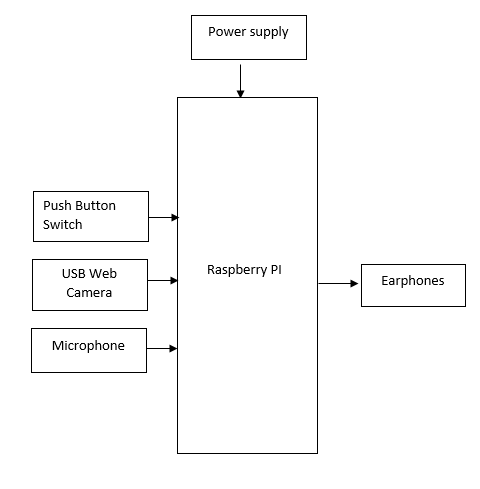
This project presents a real-time language translation system leveraging Optical Character Recognition (OCR) and speech-to-text technology, developed with a Raspberry Pi microcontroller. The system is designed to translate both spoken language and text captured from images into multiple languages, with audio feedback provided through earphones. Two modes of operation are enabled by push-button switches: speech-to-text mode, where spoken words are transcribed, translated into three languages, and relayed audibly; and OCR detection mode, where an image containing English text is captured via a USB web camera, converted to text, translated, and outputted in multiple languages through text-to-speech. The project utilizes a USB microphone to capture spoken input, while connectors and additional push buttons facilitate interaction between components. This translator aims to provide a seamless, accessible solution for real-time multilingual communication across text and speech inputs, benefiting users in various language contexts.
NOTE: Without the concern of our team, please don't submit to the college. This Abstract varies based on student requirements.
Block Diagram
Specifications
- - Raspberry Pi
- - Push button switches
- - Earphones
- - USB microphone
- - Connectors
- - USB web camera
Learning Outcomes
- - Raspberry Pi architecture and pin diagram
- - Setting up and installing the Raspberry Pi environment
- - Introduction to programming in the Raspberry Pi environment
- - Working with OCR and speech-to-text functions
- - Basic coding for language translation tasks
- - Integrating microphone and camera modules with Raspberry Pi
- - Understanding power requirements for Raspberry Pi
- About Project Development Life Cycle:
- Planning and Requirement Gathering (software’s, Tools, Hardware components, etc.,)
- Schematic preparation
- Code development and debugging
- Hardware development and debugging
- Development of the Project and Output testing
- Practical exposure to:
- Hardware and software tools.
- Solution providing for real time problems.
- Working with team/ individual.
- Work on Creative ideas.
- Project development Skills
- Problem analyzing skills
- Problem solving skills
- Creativity and imaginary skills
- Programming skills
- Deployment
- Testing skills
- Debugging skills
- Project presentation skills
- Thesis writing skills


 Paper Publishing

Request Call Back
Would you like to receive a free callback now?
Choose the best time for callback:
Leave your message and we will contact you as soon as possible

6-2-85/B, Old Maternity Hospital Road, Thyagaraja Nagar, Tirupati, Andhra Pradesh – 517501
+91 9030333433
+91 9393939065
0877-2261612

Disclaimer - Takeoff Edu Group Projects are not associated or affiliated with IEEE in any way. The IEEE Projects mentioned here are mentioned in the context of student projects, whose ideas are derived from IEEE publications, not projects of or by IEEE.

