Underwater Data Transmission Using LiFi Technology with Raspberry Pi Pico W and Arduino
Objective
To develop an underwater communication system using LiFi technology to transmit and decode status signals with Raspberry Pi Pico W and Arduino, enhancing safety and situational awareness.
Abstract
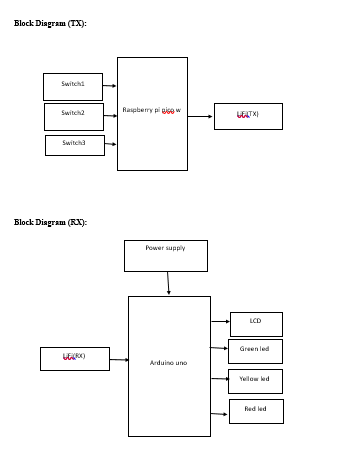
This project explores the implementation of underwater data transmission using Light Fidelity (LiFi) technology, leveraging the Raspberry Pi Pico W and Arduino platforms. The system consists of two main components: a transmitting side and a receiving side. On the transmitting side, the Raspberry Pi Pico W is used to interface with three switches, each representing a distinct status: "I’m Safe," "I Need Food," and "I’m in Danger." These switches are designed to trigger specific light signals for underwater transmission.The receiving side features an Arduino board connected to an LCD display and three LEDs (red, green, and yellow). The Arduino decodes the received light signals and indicates the status by activating the corresponding LED. Specifically, a green LED signifies "I’m Safe," a yellow LED indicates "I Need Food," and a red LED represents "I’m in Danger."This system demonstrates the potential of LiFi technology for underwater communication, providing a practical solution for conveying critical status information in environments where conventional radio frequency communications are ineffective. The use of visual signals transmitted through light ensures reliable and clear communication, enhancing safety and situational awareness in underwater settings.
NOTE: Without the concern of our team, please don't submit to the college. This Abstract varies based on student requirements.
Block Diagram
Specifications
Hardware Requirements:
- Arduino Uno
- LiFi
- leds
- switches
- raspberry pi pico w
- LCD
- Power supply
Software Requirements:
- Arduino IDE
- Embedded c
- Thonny IDE
- python
Learning Outcomes
- Arduino diagram and architecture
- How to install Arduino IDE software
- Setting up and installation procedure for Arduino
- Introduction to Arduino IDE
- Basic coding in Arduino IDE
- Raspberry pi pico w diagram and architecture
- How to install Thonny IDE software
- Setting up and installation procedure for Thonny
- Introduction to Thonny IDE
- Basic coding in Thonny IDE
- Working of LiFi
- Working of switches
- Interface leds sensor with Arduino?
- Working of power supply
- About Project Development Life Cycle:
- Planning and Requirement Gathering (software’s, Tools, Hardware components, etc.,)
- Schematic preparation
- Code development and debugging
- Hardware development and debugging
- Development of the Project and Output testing
- Practical exposure to:
- Hardware and software tools.
- Solution providing for real time problems.
- Working with team/ individual.
- Work on Creative ideas.
- Project development Skills
- Problem analyzing skills
- Problem solving skills
- Creativity and imaginary skills
- Programming skills
- Deployment
- Testing skills
- Debugging skills
- Project presentation skills
- Thesis writing skills


 Paper Publishing

Request Call Back
Would you like to receive a free callback now?
Choose the best time for callback:
Leave your message and we will contact you as soon as possible

6-2-85/B, Old Maternity Hospital Road, Thyagaraja Nagar, Tirupati, Andhra Pradesh – 517501
+91 9030333433
+91 9393939065
0877-2261612

Disclaimer - Takeoff Edu Group Projects are not associated or affiliated with IEEE in any way. The IEEE Projects mentioned here are mentioned in the context of student projects, whose ideas are derived from IEEE publications, not projects of or by IEEE.

