Temperature based fan speed control
Objective
The main objective of this project is to control speed of fan based on change in temperature
Abstract
As we all know that we are slowly moving toward automation and Automation is one of the trending topics. So basically in this project we will be controlling fan speed with respect to the temperature. The system will get the temperature from the temperature Sensor and it will control the speed according to the temperature, set by the user. In this project, microcontroller forms the processing part, which firstly senses the temperature and the controller then compares the data with the set temperature. If the current temperature is greater than the set temperature, the controller turns ON the fan and the set speed will be proportional to the difference between the set temperature & the current temperature. The fan’s speed will change according to the temperature.
Keywords: Arduino Uno, DHT11 sensor, Relay, CPU fan, power supply
NOTE: Without the concern of our team, please don't submit to the college. This Abstract varies based on student requirements.
Block Diagram
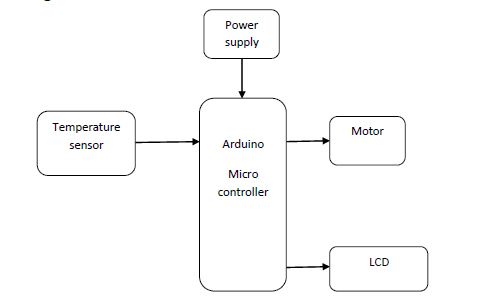
Specifications
- Arduino Uno
- DHT11 sensor
- Relay
- CPU fan
- Power supply
- Arduino IDE
- Embedded C
Learning Outcomes
- Arduino pin diagram and architecture
- How to install Arduino IDE software
- Setting up and installation procedure for Arduino
- Introduction to Arduino IDE
- Basic coding in Arduino IDE
- Working of DHT11 sensor
- Interface DHT11 sensor with Arduino?
- Working of Relay
- Interface Relay with Arduino?
- Working of CPU fan
- Interface CPU fan with Arduino?
- Working of power supply
- About Project Development Life Cycle:
- Planning and Requirement Gathering( software’s, Tools, Hardware components, etc.,)
- Schematic preparation
- Code development and debugging
- Hardware development and debugging
- Development of the Project and Output testing
- Practical exposure to:
- Hardware and software tools.
- Solution providing for real time problems.
- Working with team/ individual.
- Work on Creative ideas.
- Project development Skills
- Problem analyzing skills
- Problem solving skills
- Creativity and imaginary skills
- Programming skills
- Deployment
- Testing skills
- Debugging skills
- Project presentation skills
- Thesis writing skills
Demo Video


Request for Video
 Paper Publishing
Request Call Back
Would you like to receive a free callback now?
Choose the best time for callback:
Leave your message and we will contact you as soon as possible

6-2-85/B, Old Maternity Hospital Road, Thyagaraja Nagar, Tirupati, Andhra Pradesh – 517501
+91 9030333433
+91 9393939065
0877-2261612

Disclaimer - Takeoff Edu Group Projects are not associated or affiliated with IEEE in any way. The IEEE Projects mentioned here are mentioned in the context of student projects, whose ideas are derived from IEEE publications, not projects of or by IEEE.

