Smart Home Automation System Using Raspberry Pi Pico W and Blynk
Objective
To design and implement a home automation system that utilizes Raspberry Pi Pico W and the Blynk app for remote control and real-time management of household appliances.
Abstract
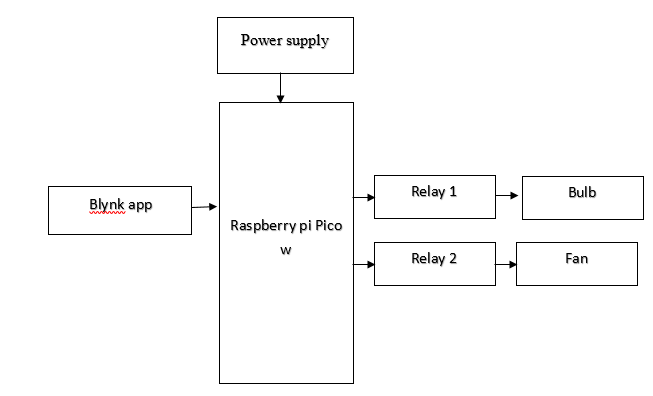
This project demonstrates an advanced home automation system using a Raspberry Pi Pico W and the Blynk app to control household appliances. The Raspberry Pi Pico W, equipped with built-in Wi-Fi, acts as the central controller, interfacing with the Blynk app to manage two relays. Relay 1 is used to control a 100W incandescent bulb, and Relay 2 manages a CPU fan. Through the Blynk app, users can operate these relays via virtual switches: Switch 1 toggles Relay 1 to turn the bulb on or off, while Switch 2 controls Relay 2 to manage the fan. When a switch is activated on the app, the corresponding relay responds, automating the operation of the devices. This setup offers the convenience of remote control and real-time monitoring from any location with internet access, showcasing a practical and scalable solution for modern home automation needs. The intuitive Blynk interface and the versatility of the Raspberry Pi Pico W combine to provide an efficient and user-friendly automation system..
NOTE: Without the concern of our team, please don't submit to the college. This Abstract varies based on student requirements.
Block Diagram
Specifications
Hardware Requirements:
- Raspberry pi Pico w
- relay
- power supply
- 100 w bulb
- CPU fan
Software Requirements:
- Thonny IDE
Learning Outcomes
- Raspberry pi Pico w pin diagram and architecture
- How to install Thonny IDE software
- Introduction to Thonny IDE
- Basic coding in Thonny IDE
- Working of Interface with Raspberry pi Pico w?
- Working of Relay
- Interface Relay with Raspberry pi Pico w?
- Working of power supply
- About Project Development Life Cycle:
- Planning and Requirement Gathering (software’s, Tools, Hardware components, etc.,)
- Schematic preparation
- Code development and debugging
- Hardware development and debugging
- Development of the Project and Output testing
- Practical exposure to:
- Hardware and software tools.
- Solution providing for real time problems.
- Working with team/ individual.
- Work on Creative ideas.
- Project development Skills
- Problem analyzing skills
- Problem solving skills
- Creativity and imaginary skills
- Programming skills
- Deployment
- Testing skills
- Debugging skills
- Project presentation skills


 Paper Publishing

Request Call Back
Would you like to receive a free callback now?
Choose the best time for callback:
Leave your message and we will contact you as soon as possible

6-2-85/B, Old Maternity Hospital Road, Thyagaraja Nagar, Tirupati, Andhra Pradesh – 517501
+91 9030333433
+91 9393939065
0877-2261612

Disclaimer - Takeoff Edu Group Projects are not associated or affiliated with IEEE in any way. The IEEE Projects mentioned here are mentioned in the context of student projects, whose ideas are derived from IEEE publications, not projects of or by IEEE.

