Sensepods: A Zigbee-based Tangible Smart Home Interface
Abstract
Low-cost sensors and ubiquitous wireless networking is enabling novel ways in which homeowners can interact with their smart homes. Many complementary approaches like using voice commands, direct interaction by using touch or weight, or by using body gestures are emerging.
This project shows the design and implementation of a novel low-power, low-cost, hand-held wireless device called a SensePod. SensePods can be used by a consumer to interact with a smart home using simple gestures like rubbing, taping or rolling the device on any home surface like a dining table. The device is only 4.5 cm long, forms an ad-hoc wireless network using the ZigBee protocol, and can be easily interfaced to existing home management systems. The gestures in each device can be programmed to control various objects of a smart home like smart curtains, for example. Hidden Markov Models (HMM) were used to train the device to recognize various gestures. The device was tested with a variety of gestures and has a recognition rate of over 99.7%, and a response time of less than two milliseconds.
NOTE: Without the concern of our team, please don't submit to the college. This Abstract varies based on student requirements.
Block Diagram
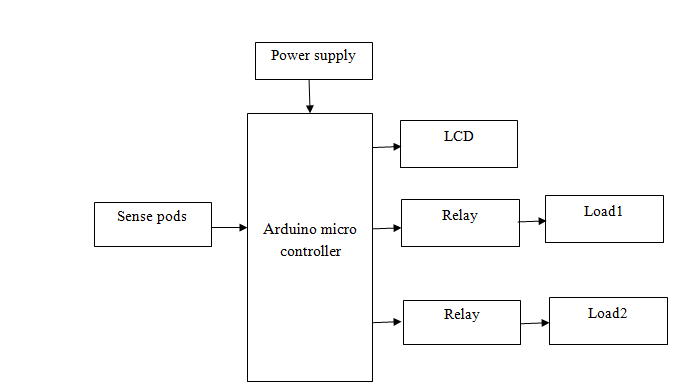
Specifications
Learning Outcomes
- Arduino Pin diagram and Architecture
- How to install Arduino IDE Software
- Setting up and Installation procedures for Arduino IDE
- Introduction to Arduino IDE
- Commands in Embedded C
- How to install Libraries?
- Basic coding in Embedded C
- Working of Sense pods
- How to interface Relay with Arduino
- Working of LCD
- How to interface LCD with Arduino
- About Project Development Life Cycle:
- Planning and Requirement Gathering (software’s, Tools, Hardware components, etc.,)
- Schematic preparation
- Code development and debugging
- Hardware development and debugging
- Development of the Project and Output testing
- Practical exposure to:
- Hardware and software tools.
- Solution providing for real time problems.
- Working with team/ individual.
- Work on Creative ideas.
- Project development Skills
- Problem analyzing skills
- Problem solving skills
- Creativity and imaginary skills
- Programming skills
- Deployment
- Testing skills
- Debugging skills
- Project presentation skills
- Thesis writing skills


 Paper Publishing

Request Call Back
Would you like to receive a free callback now?
Choose the best time for callback:
Leave your message and we will contact you as soon as possible

6-2-85/B, Old Maternity Hospital Road, Thyagaraja Nagar, Tirupati, Andhra Pradesh – 517501
+91 9030333433
+91 9393939065
0877-2261612

Disclaimer - Takeoff Edu Group Projects are not associated or affiliated with IEEE in any way. The IEEE Projects mentioned here are mentioned in the context of student projects, whose ideas are derived from IEEE publications, not projects of or by IEEE.

