SELFISH NODE DETECTION WITH QUEUE LEARNING BASED WSN
Objective
Implement Queue Learning to detect selfish nodes in Wireless Sensor Networks, reducing packet loss and enhancing network performance by monitoring nodes over time to assess their behavior and trustworthiness.
Abstract
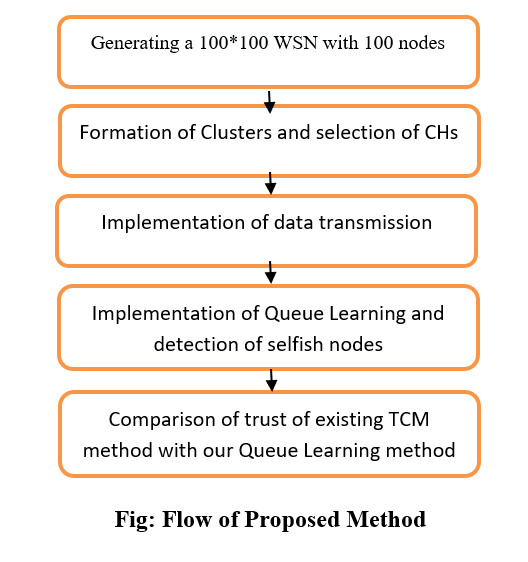
In WSN, there exists a major need for detection of selfish nodes which will degrade the performance and trust inside the network. Selfish nodes are those that behave selfishly due to many reasons resulting in not sharing any packets of their neighbors to the BS resulting in packets loss. The selfish behaviour arises from one of the main reasons is lack of energy to transmit the packets at that particular instant which will actually degrade the performance and trust in the network. Here, in this implementation, we’re aiming to implement the Queue Learning based selfish nodes detection which will not only remove the selfish nodes during routing to the BS but also observe their behaviour over periods of time before declaring a node selfish. The thing is all nodes in the network will act selfishly during particular instants of time depending on their residual energy, so, we can’t declare a node selfish instantly after encountering its selfish behavior, we need to observe that node for longer periods of time and we need to calculate the tolerable trust beyond which it will be declared as a selfish node. Our implementation will perform better than existing methods like TCM model etc.
Keywords: Wireless Sensor Network, Internet of Things, Selfish Node Detection, Queue Learning, Trust in the network.
NOTE: Without the concern of our team, please don't submit to the college. This Abstract varies based on student requirements.
Block Diagram
Specifications
Software: Matlab 2020a or above
Hardware:
Operating Systems:
- Windows 10
- Windows 7 Service Pack 1
- Windows Server 2019
- Windows Server 2016
Processors:
Minimum: Any Intel or AMD x86-64 processor
Recommended: Any Intel or AMD x86-64 processor with four logical cores and AVX2 instruction set support
Disk:
Minimum: 2.9 GB of HDD space for MATLAB only, 5-8 GB for a typical installation
Recommended: An SSD is recommended A full installation of all MathWorks products may take up to 29 GB of disk space
RAM:
Minimum: 4 GB
Recommended: 8 GB
Learning Outcomes
· Introduction to Matlab
· What is EISPACK & LINPACK
· How to start with MATLAB
· About Matlab language
· Matlab coding skills
· About tools & libraries
· Application Program Interface in Matlab
· About Matlab desktop
· How to use Matlab editor to create M-Files
· Features of Matlab
· Basics on Matlab
· What is an Image/pixel?
· About image formats
· Introduction to Image Processing
· How digital image is formed
· Importing the image via image acquisition tools
· Analyzing and manipulation of image.
· Phases of image processing:
o Acquisition
o Image enhancement
o Image restoration
o Color image processing
o Image compression
o Morphological processing
o Segmentation etc.,
· How to extend our work to another real time applications
· Project development Skills
o Problem analyzing skills
o Problem solving skills
o Creativity and imaginary skills
o Programming skills
o Deployment
o Testing skills
o Debugging skills
o Project presentation skills
o Thesis writing skills


 Paper Publishing

Request Call Back
Would you like to receive a free callback now?
Choose the best time for callback:
Leave your message and we will contact you as soon as possible

6-2-85/B, Old Maternity Hospital Road, Thyagaraja Nagar, Tirupati, Andhra Pradesh – 517501
+91 9030333433
+91 9393939065
0877-2261612

Disclaimer - Takeoff Edu Group Projects are not associated or affiliated with IEEE in any way. The IEEE Projects mentioned here are mentioned in the context of student projects, whose ideas are derived from IEEE publications, not projects of or by IEEE.

