Secure Fingerprint Bank Locker With Image Capture
Also Available Domains WSN|Image Processing|Embedded with Matlab
Objective
The main objective of this project is to Open and close Bank locker using secure fingerprint
Abstract
In this project, we present the design and implementation of a fingerprint door lock system using a Raspberry pi microcontroller, a fingerprint sensor, an electromagnetic lock, and an LCD. The system aims to provide a secure and convenient means of access control for doors by utilizing biometric authentication. The Raspberry pi acts as the central processing unit, facilitating communication between the various components. The fingerprint sensor captures the unique fingerprint patterns of individuals, which are then compared against stored templates to verify their identity. The electromagnetic lock, controlled by the Raspberry pi, secures or releases the door depending on the authentication result.
The system operates in two modes: registration mode and authentication mode. In registration mode, users can able to register using input data from keyboard to navigate the menu and register their fingerprints. The Raspberry pi stores the fingerprint templates in its memory for future authentication. In authentication mode, users place their registered finger on the sensor, which captures the fingerprint data and matches it with the stored templates. If the authentication is successful, the Raspberry pi sends a signal to the electromagnetic lock to unlock the door temporarily. If the authentication is failed then the camera will able to capture the image and sent through mail to the receipts.
Keywords : Raspberry pi, Fingerprint Verification, Image capture, LCD.
NOTE: Without the concern of our team, please don't submit to the college. This Abstract varies based on student requirements.
Block Diagram
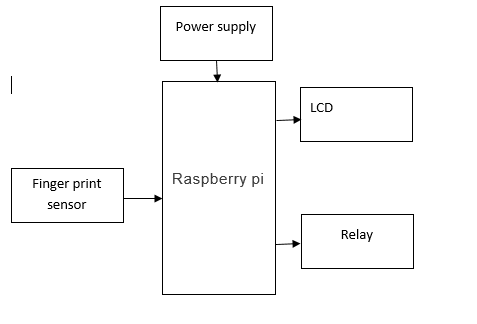
Specifications
Hardware Requirements:
- Raspberry pi
- Finger Print Sensor
- Power Supply
- Relay
- LCD
Software Requirements:
- Raspbian OS
- Python
Learning Outcomes
- Raspberry pi pin diagram and architecture
- How to install Raspberry pi software
- Setting up and installation procedure for Raspberry pi
- Introduction to Raspberry pi
- Basic coding in Raspberry pi
- Working of LCD
- Interface LCD with Raspberry pi
- Working of power supply
- About Project Development Life Cycle:
- Planning and Requirement Gathering (software’s, Tools, Hardware components, etc.,)
- Schematic preparation
- Code development and debugging
- Hardware development and debugging
- Development of the Project and Output testing
- Practical exposure to:
- Hardware and software tools.
- Solution providing for real time problems.
- Working with team/ individual.
- Work on Creative ideas.
- Project development Skills
- Problem analyzing skills
- Problem solving skills
- Creativity and imaginary skills
- Programming skills
- Deployment
- Testing skills
- Debugging skills
- Project presentation skills


 Paper Publishing

Request Call Back
Would you like to receive a free callback now?
Choose the best time for callback:
Leave your message and we will contact you as soon as possible

6-2-85/B, Old Maternity Hospital Road, Thyagaraja Nagar, Tirupati, Andhra Pradesh – 517501
+91 9030333433
+91 9393939065
0877-2261612

Disclaimer - Takeoff Edu Group Projects are not associated or affiliated with IEEE in any way. The IEEE Projects mentioned here are mentioned in the context of student projects, whose ideas are derived from IEEE publications, not projects of or by IEEE.

