RFID Secured Intelligent Battery Management System with Predictive Analytics and Cloud Connectivity
Objective
This study aims to develop an intelligent MATLAB/Simulink-based battery management system integrating ML-driven SoC/SoH estimation, RFID security, and cloud-enabled diagnostics to enhance accuracy, reliability, and real-time monitoring of EV batteries.
Abstract
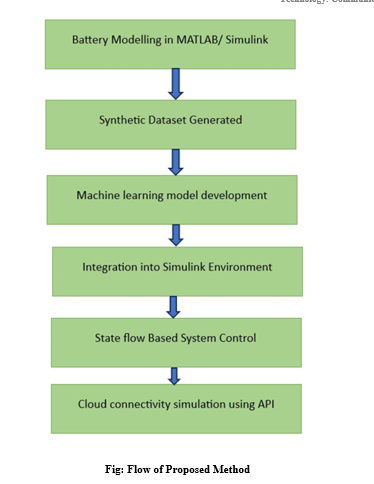
The accelerating adoption of electric vehicles (EVs), renewable energy infrastructure, and smart-grid technologies has created a heightened demand for advanced Battery Management Systems (BMS) capable of delivering precise, secure, and intelligent control. Although traditional estimation techniques—such as Coulomb Counting and Extended Kalman Filters (EKF)—continue to be widely used due to their simplicity and real-time performance, they suffer from notable limitations. Sensor noise, model uncertainties, and progressive battery aging can significantly diminish the accuracy of State of Charge (SoC) and State of Health (SoH) assessments, ultimately impacting reliability in real-world applications like EV range prediction and energy storage diagnostics. To mitigate these challenges, an Intelligent Battery Management System (IBMS) is designed within a MATLAB/Simulink simulation framework. This system integrates machine learning (ML)-driven SoC/SoH estimators trained on synthetic battery datasets, yielding superior predictive accuracy compared to conventional methods. Enhanced security is achieved through RFID-based access control, restricting system interaction to authorized users. Furthermore, API-enabled cloud connectivity provides real-time telemetry, remote diagnostics, and predictive analytics. System operation—covering charging, discharging, idle, and fault states—is managed through Stateflow logic, ensuring robust, adaptive, and fault-tolerant behavior.
Keywords: Intelligent Battery Management System (IBMS), Battery Management System (BMS), State of Charge (SoC), State of Health (SoH), Machine Learning (ML), Electric Vehicles (EVs).
NOTE: Without the concern of our team, please don't submit to the college. This Abstract varies based on student requirements.
Block Diagram
Specifications
Software: Matlab 2022b or above
Hardware:
Operating Systems:
- Windows 10
- Windows 7 Service Pack 1
- Windows Server 2019
- Windows Server 2016
Processors:
Minimum: Any Intel or AMD x86-64 processor
Recommended: Any Intel or AMD x86-64 processor with four logical cores and AVX2 instruction set support
Disk:
Minimum: 2.9 GB of HDD space for MATLAB only, 5-8 GB for a typical installation
Recommended: An SSD is recommended A full installation of all MathWorks products may take up to 29 GB of disk space
RAM:
Minimum: 4 GB
Recommended: 8 GB
Learning Outcomes
· Introduction to Matlab
· What is EISPACK & LINPACK
· How to start with MATLAB
· About Matlab language
· Matlab coding skills
· About tools & libraries
· Application Program Interface in Matlab
· About Matlab desktop
· How to use Matlab editor to create M-Files
· Features of Matlab
· Basics on Matlab
· What is Communication?
· About Communication
· Introduction to Communication
· How Communication Works?
· Importing the System Design, Characterization and Visualization
· Analyzing of BER tool
· Analyzing of Error Rate Test Console
· Generation of WSN
· WSN network creation
· Nodes Communication
· Clustering
· Routing
· Convolutional
· Equalization and Synchronization etc.,
· How to extend our work to another real time applications
· Project development Skills
o Problem analyzing skills
o Problem solving skills
o Creativity and imaginary skills
o Programming skills
o Deployment
o Testing skills
o Debugging skills
o Project presentation skills
o Thesis writing skillsDemo Video


Request for Video
 Paper Publishing
Request Call Back
Would you like to receive a free callback now?
Choose the best time for callback:
Leave your message and we will contact you as soon as possible

6-2-85/B, Old Maternity Hospital Road, Thyagaraja Nagar, Tirupati, Andhra Pradesh – 517501
+91 9030333433
+91 9393939065
0877-2261612

Disclaimer - Takeoff Edu Group Projects are not associated or affiliated with IEEE in any way. The IEEE Projects mentioned here are mentioned in the context of student projects, whose ideas are derived from IEEE publications, not projects of or by IEEE.

