Retest web application
Objective
The Retest Web Application streamlines the application process by allowing students to register, log in, and submit applications online. Administrators can efficiently track and manage requests through a centralized platform. The system ensures data accuracy, security, and transparency, with role-based authentication and automated notifications to keep users informed, making the process more efficient.
Abstract
Retest web application
ABSTRACT
The Retest Web Application greatly simplifies the process for students to apply for retests and for administrators to efficiently manage these applications. Students can easily register and log in to their accounts, where they can then fill out a detailed retest application form and submit all the necessary information for review. This streamlined process makes it easy for students to apply without unnecessary delays or confusion. On the other side, administrators can log in to view all applications in one centralized system, track the status of each application, and manage detailed student information in a secure and organized manner. The system is designed to offer a seamless and highly secure experience for both students and administrators. It automates key aspects of the retest application process, reducing administrative workload and minimizing the chances of human error. This results in accurate data management and efficient processing of all applications. Real-time notifications are sent to both students and administrators to keep them updated on the status of applications, ensuring that everyone involved is well-informed and that no important updates are missed. In addition, the system provides an intuitive, user-friendly interface, making it easy for users with varying levels of technical expertise to navigate and interact with the application. The application helps streamline the retest request process by creating a secure, efficient, and automated environment that supports the smooth management and processing of student applications, ultimately saving time and improving the overall experience for all users.
Keywords: Retest, Student, Admin, Application
NOTE: Without the concern of our team, please don't submit to the college. This Abstract varies based on student requirements.
Block Diagram
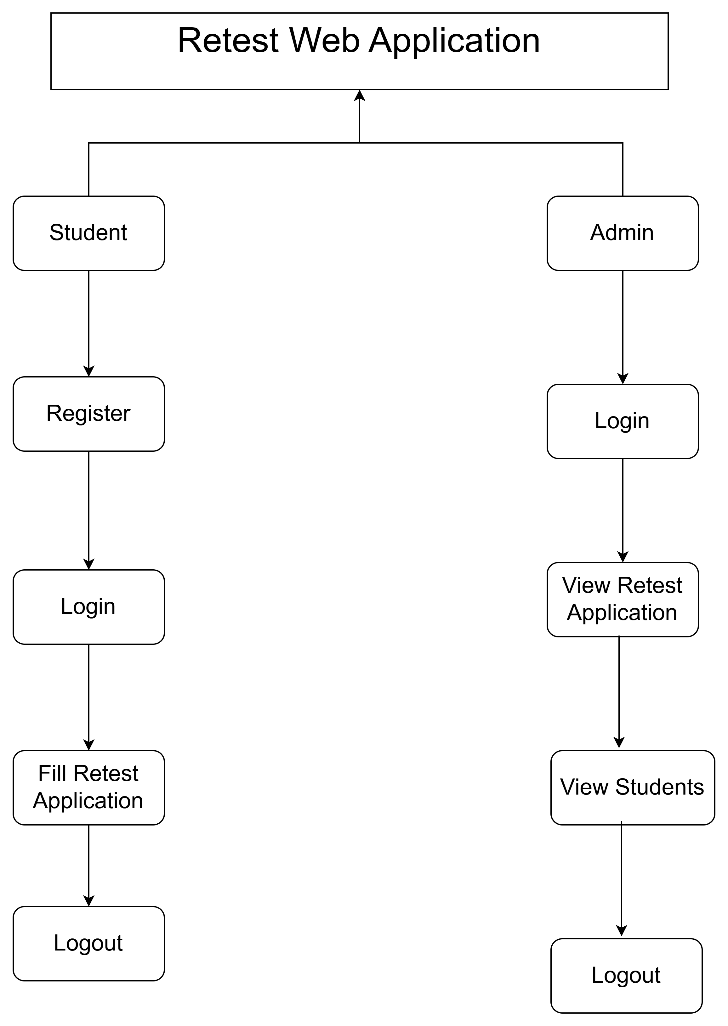
Specifications
SOFTWARE FRONT END REQUIREMENTS
H/W CONFIGURATION:Processor - I3/Intel Processor
Hard Disk - 160GB
Key Board - Standard Windows Keyboard
Mouse - Two or Three Button Mouse
Monitor - SVGA
RAM - 8GB
S/W CONFIGURATION:
Operating System : Windows 7/8/10
Frontend : React JS
Programming Language : Java
Libraries : Spring boot
IDE/Workbench : Intellij IDEA
Technology : java 1.7+
Server Deployment : Tomcat Server


Related Projects
 Paper Publishing

Request Call Back
Would you like to receive a free callback now?
Choose the best time for callback:
Leave your message and we will contact you as soon as possible

6-2-85/B, Old Maternity Hospital Road, Thyagaraja Nagar, Tirupati, Andhra Pradesh – 517501
+91 9030333433
+91 9393939065
0877-2261612

Disclaimer - Takeoff Edu Group Projects are not associated or affiliated with IEEE in any way. The IEEE Projects mentioned here are mentioned in the context of student projects, whose ideas are derived from IEEE publications, not projects of or by IEEE.

