Reader For Visually Impaired People Using Raspberry Pi
Also Available Domains WSN
Objective
The main objective of this project is to navigate visually impaired people in an indoor environment with the help of raspberry pi by identifying the objects that are present in his path and guiding him through speech via headphones.
Abstract
Visually impaired people are facing many difficulties to read the text on the paper without human assistance. We present a smart device that assists the visually impaired which effectively and efficiently reads paper-printed text. The proposed project uses the methodology of a camera based assistive device that can be used by people to read text document.
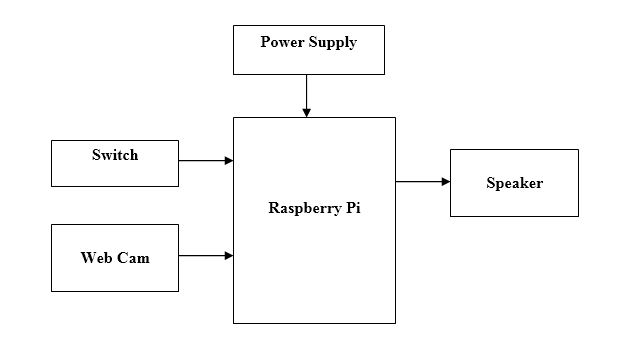
In this project we have proposed a text read out system for the visually challenged. For that we are using webcam to capture the images and send to Raspberry Pi. The captured image will be decoded by the Raspberry Pi and sends voice output through speaker. Here switch is used to initiate the process.
NOTE: Without the concern of our team, please don't submit to the college. This Abstract varies based on student requirements.
Block Diagram
Specifications
Hardware
Requirements:
- Raspberry Pi
- Micro SD card
- Jumper Wires
- Camera
- Headphones
- 5V Adapter
- Switch
- Connecting wires
- NOOBS Software
- Python3 IDE
- VNC Viewer
- Fritzing
Learning Outcomes
- Raspberry Pi Pin diagram and Architecture
- How to install NOOBS Software
- Setting up and Installation procedures for Raspberry Pi
- How to connect Raspberry Pi through VNC viewer?
- Introduction to Python3 IDE
- Commands in Python
- How to install Libraries for sensors?
- Basic coding in Python
- Working of YOLO and gTTS algorithm
- How to interface camera and gTTS with Raspberry Pi?
- How to interface switch with Raspberry Pi?
- How to interface headphones with Raspberry Pi?
- About Project Development Life Cycle:
- Planning and Requirement Gathering( software’s, Tools, Hardware components, etc.,)
- Schematic preparation
- Code development and debugging
- Hardware development and debugging
- Development of the Project and Output testing
- Practical exposure to:
- Hardware and software tools. ,
- Solution providing for real time problems,
- Working with team/ individual,
- Work on Creative ideas.
- Project development Skills:
- Problem analyzing skills
- Problem solving skills
- Creativity and imaginary skills
- Programming skills
- Deployment
- Testing skills
- Debugging skills
- Project presentation skills
- Thesis writing skills
Demo Video


Request for Video
 Paper Publishing
Request Call Back
Would you like to receive a free callback now?
Choose the best time for callback:
Leave your message and we will contact you as soon as possible

6-2-85/B, Old Maternity Hospital Road, Thyagaraja Nagar, Tirupati, Andhra Pradesh – 517501
+91 9030333433
+91 9393939065
0877-2261612

Disclaimer - Takeoff Edu Group Projects are not associated or affiliated with IEEE in any way. The IEEE Projects mentioned here are mentioned in the context of student projects, whose ideas are derived from IEEE publications, not projects of or by IEEE.

