Quality Guided Skin Tone Enhancement for Portrait Photography
Objective
To develop a quality-guided skin tone enhancement system that improves portrait image appearance by accurately adjusting luminance and color characteristics using CIELAB-based processing, clustering, and CNN-driven LUT prediction.
Abstract
Quality-Guided Skin Tone Enhancement for Portrait Photography
Abstract:
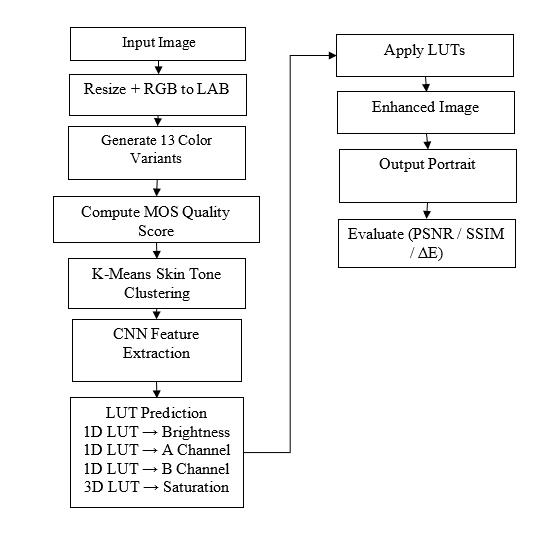
Portrait photography plays a vital role in personal and professional communication, where skin tone quality significantly affects the visual appeal of an image. However, factors such as lighting conditions, camera settings, and color space limitations often result in inaccurate or unpleasant skin tone reproduction. This paper presents a Quality-Guided Skin Tone Enhancement system for portrait photography that intelligently improves skin tone appearance using artificial intelligence and image processing techniques. The proposed method converts portrait images from the RGB color space to the perceptually uniform CIELAB color space to enable accurate color manipulation. K-means clustering is applied to group images with similar skin tone characteristics into meaningful clusters. A convolutional neural network–based feature extraction module captures image statistics, a quality score, and the skin tone cluster label to generate enhancement parameters. The system predicts both one-dimensional and three-dimensional Look-Up Tables to adjust luminance, color balance, and saturation in a controllable manner. Enhancement intensity is guided by a quality score ranging from low to high, giving users flexible control over the output. Quantitative evaluation using PSNR, SSIM, and Delta-E metrics demonstrates that the proposed method consistently outperforms the baseline identity LUT approach, producing visually pleasing and perceptually accurate portrait skin tones across diverse racial categories.
Keywords: Skin Tone Enhancement, Portrait Photography, Look-Up Table, CIELAB Color Space, Quality-Guided Image Processing.
NOTE: Without the concern of our team, please don't submit to the college. This Abstract varies based on student requirements.
Block Diagram
Specifications
Software: Matlab 2022b or above
Hardware:
Operating Systems:
- Windows 10
- Windows 7 Service Pack 1
- Windows Server 2019
- Windows Server 2016
Processors:
Minimum: Any Intel or AMD x86-64 processor
Recommended: Any Intel or AMD x86-64 processor with four logical cores and AVX2 instruction set support
Disk:
Minimum: 2.9 GB of HDD space for MATLAB only, 5-8 GB for a typical installation
Recommended: An SSD is recommended A full installation of all MathWorks products may take up to 29 GB of disk space
RAM:
Minimum: 4 GB
Recommended: 8 GB
Learning Outcomes
· Introduction to Matlab
· What is EISPACK & LINPACK
· How to start with MATLAB
· About Matlab language
· Matlab coding skills
· About tools & libraries
· Application Program Interface in Matlab
· About Matlab desktop
· How to use Matlab editor to create M-Files
· Features of Matlab
· Basics on Matlab
· What is an Image/pixel?
· About image formats
· Introduction to Image Processing
· How digital image is formed
· Importing the image via image acquisition tools
· Analyzing and manipulation of image.
· Phases of image processing:
o Acquisition
o Image enhancement
o Image restoration
o Color image processing
o Image compression
o Morphological processing
o Segmentation etc.,
· How to extend our work to another real time applications
· Project development Skills
o Problem analyzing skills
o Problem solving skills
o Creativity and imaginary skills
o Programming skills
o Deployment
o Testing skills
o Debugging skills
o Project presentation skills
o Thesis writing skills
Demo Video


Request for Video
 Paper Publishing
Request Call Back
Would you like to receive a free callback now?
Choose the best time for callback:
Leave your message and we will contact you as soon as possible

6-2-85/B, Old Maternity Hospital Road, Thyagaraja Nagar, Tirupati, Andhra Pradesh – 517501
+91 9030333433
+91 9393939065
0877-2261612

Disclaimer - Takeoff Edu Group Projects are not associated or affiliated with IEEE in any way. The IEEE Projects mentioned here are mentioned in the context of student projects, whose ideas are derived from IEEE publications, not projects of or by IEEE.

