Professor Performance Points Tracker
Objective
The primary objective of the Professor Performance Points Tracker is to develop a robust and user-friendly web application that enables professors to systematically track, manage, and visualize their academic performance throughout the year. It aims to provide features such as adding custom fields, assigning points, maintaining a year-wise performance record, and offering insightful data visualization through charts and tables, promoting self-assessment and facilitating professional growth.
Abstract
The Professor Performance Points Tracker is a web-based application developed using the MERN stack (MongoDB, Express.js, React.js, and Node.js) to help professors track and manage their academic performance throughout the year. The system allows professors to add custom fields representing different academic activities, such as research publications, conferences attended, or administrative duties. Points can be assigned to these fields based on their relevance or significance, enabling a comprehensive evaluation of performance.
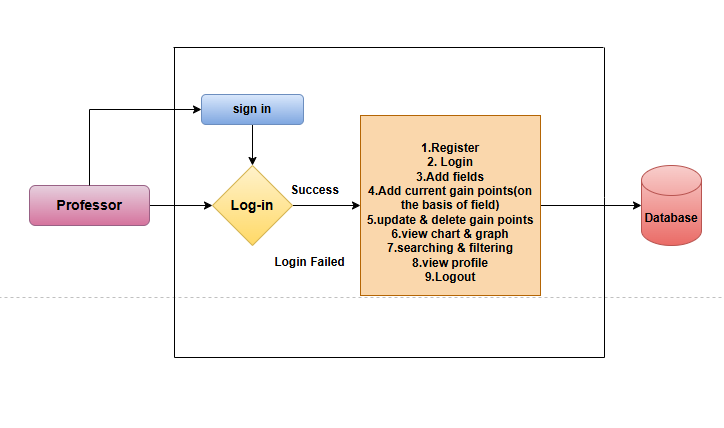
The application provides complete CRUD (Create, Read, Update, Delete) functionality for managing gained points and visualizes the data through tables and interactive charts. Users can view year-wise performance trends and analyze their progress across various academic activities. Features like registration, login, and profile management ensure a personalized experience for every professor, maintaining data privacy and security.
This platform serves as an efficient tool for professors to maintain a detailed track record of their achievements and contributions in an academic year. By offering insights through data visualization, the project aims to promote self-assessment and help professors plan for continual professional development.
Keywords: Data Visualization, Self-Assessment Tool, Academic Performance Tracking
NOTE: Without the concern of our team, please don't submit to the college. This Abstract varies based on student requirements.
Block Diagram
Specifications
HARDWARE SYSTEM CONFIGURATION: -
Processor I3/Intel Processor
RAM 4GB
· Hard Disk 160GB
SOFTWARE SYSTEM CONFIGURATION: -
· Operating System : Windows 7/8/10
· Server side Script : Express js
· Programming Language : TypeScript
· IDE/Workbench : VS Code
· Database : Mongodb
· Clint Side : React js


Related Projects
 Paper Publishing

Request Call Back
Would you like to receive a free callback now?
Choose the best time for callback:
Leave your message and we will contact you as soon as possible

6-2-85/B, Old Maternity Hospital Road, Thyagaraja Nagar, Tirupati, Andhra Pradesh – 517501
+91 9030333433
+91 9393939065
0877-2261612

Disclaimer - Takeoff Edu Group Projects are not associated or affiliated with IEEE in any way. The IEEE Projects mentioned here are mentioned in the context of student projects, whose ideas are derived from IEEE publications, not projects of or by IEEE.

