PDF Query Assistant
Objective
The "Smart Document Querying" project allows users to upload PDF, DOC, and text files for interactive querying. Using the Gemini model and python as programming language it processes document content and provides accurate answers to user questions. The system includes secure user registration and login. The goal is to streamline document interaction, improving efficiency and productivity.
Abstract
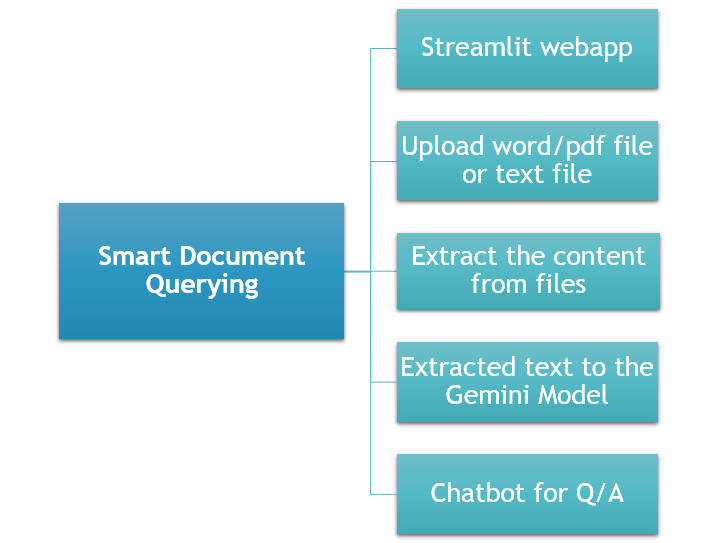
The "Smart Document Querying: Enhancing PDF and Text Interaction with the Gemini Model" project aims to provide a seamless and interactive way for users to extract information from PDF, DOC, and text files. Using the Streamlit framework, this project allows users to upload their documents and interact with them by asking questions. The system utilizes the Gemini model, a powerful language model, to analyze the contents of the uploaded files and provide relevant responses to user queries in real time. The process begins with user registration and login, ensuring secure access to the application. Once logged in, users can upload documents in various formats such as PDFs, DOCs, or text files. After uploading, users can ask questions related to the document's content, and the system will use the Gemini model to process the text and provide accurate answers. This project not only enhances user interaction with documents but also simplifies the process of extracting information from lengthy and complex files. The goal is to make document querying more efficient, offering a smart, user-friendly interface that improves productivity and enhances the overall document handling experience.
Keywords: AI, Streamlit, document extraction, PDF, audio processing, Gemini API, user interaction, text extraction, conversational platform.
NOTE: Without the concern of our team, please don't submit to the college. This Abstract varies based on student requirements.
Block Diagram
Specifications
5.2 Hardware Requirements
Processor - I3/Intel Processor
Hard Disk - 160GB
Key Board - Standard Windows Keyboard
Mouse - Two or Three Button Mouse
Monitor - SVGA
RAM - 8GB
5.3 Software Requirements
• Operating System : Windows 7/8/10
• Programming Language : Python
• Libraries : Streamlit, google generative ai
• IDE/Workbench : Visual Studio Code.


 Paper Publishing

Request Call Back
Would you like to receive a free callback now?
Choose the best time for callback:
Leave your message and we will contact you as soon as possible

6-2-85/B, Old Maternity Hospital Road, Thyagaraja Nagar, Tirupati, Andhra Pradesh – 517501
+91 9030333433
+91 9393939065
0877-2261612

Disclaimer - Takeoff Edu Group Projects are not associated or affiliated with IEEE in any way. The IEEE Projects mentioned here are mentioned in the context of student projects, whose ideas are derived from IEEE publications, not projects of or by IEEE.

