Over Voltage And Under Voltage Protection System
Abstract
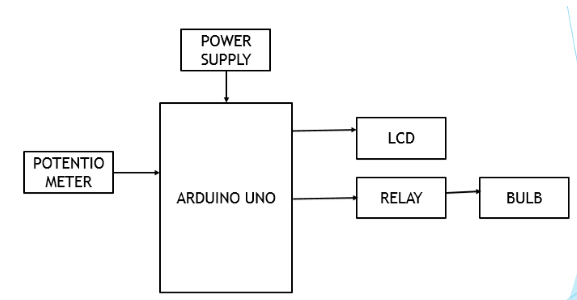
The main theme of this project is to protect the home appliance from over voltage and under voltage. If the voltage that is coming to home is higher, automatically it will damage the loads. For protecting the load from higher voltages or sudden spike in the voltage we are automatically turning off the loads when that sudden spike is observed. Here we are using arduino UNO and an 16x2 LCD display to display the voltage that was measured. A potentiometer is also used to show the variations in the voltage that is been supplying. When the voltage exceeds the range required for home appliances, a relay is used to shut the power supply passing to loads. The same happens when the voltage gets low. And a bulb is used as a load here. When this sudden rise in voltage is observed, the relay will trips and the loads will automatically turns off. This will be helpful to overcome the damage that are caused when the sudden spike or rise in voltage is observed.
Keywords: Arduino Uno, Potentiometer, power supply, LCD, Relay
NOTE: Without the concern of our team, please don't submit to the college. This Abstract varies based on student requirements.
Block Diagram
Specifications
Hardware Requirements:
- Arduino uno
- Potentiometer
- Relay
- LCD
- 4-Bit PCB with Potentiometer
- 0W Bulb
- Bulb Holder
- 5V Power supply
- 12V, 500mA Transformer
Software Requirements:
- Arduino IDE
- Embedded C
- Fritzing/Proteus
Learning Outcomes
- Arduino pin diagram and architecture
- How to install Arduino IDE software
- Setting up and installation procedure for Arduino
- Introduction to Arduino IDE
- Basic coding in Arduino IDE
- Working of Potentiometer
- Interface Potentiometer module with Arduino?
- Working of LCD
- Interface LCD with Arduino?
- Working of Relay
- Interface Relay with Arduino?
- Working of power supply
- About Project Development Life Cycle:
- Planning and Requirement Gathering( software’s, Tools, Hardware components, etc.,)
- Schematic preparation
- Code development and debugging
- Hardware development and debugging
- Development of the Project and Output testing
- Practical exposure to:
- Hardware and software tools.
- Solution providing for real time problems.
- Working with team/ individual.
- Work on Creative ideas.
- Project development Skills
- Problem analyzing skills
- Problem solving skills
- Creativity and imaginary skills
- Programming skills
- Deployment
- Testing skills
- Debugging skills
- Project presentation skills
- Thesis writing skills


 Paper Publishing

Request Call Back
Would you like to receive a free callback now?
Choose the best time for callback:
Leave your message and we will contact you as soon as possible

6-2-85/B, Old Maternity Hospital Road, Thyagaraja Nagar, Tirupati, Andhra Pradesh – 517501
+91 9030333433
+91 9393939065
0877-2261612

Disclaimer - Takeoff Edu Group Projects are not associated or affiliated with IEEE in any way. The IEEE Projects mentioned here are mentioned in the context of student projects, whose ideas are derived from IEEE publications, not projects of or by IEEE.