Machine Learning Approach for Detecting Liver Tumours in CT images using the Gray Level Co-Occurrence Metrix
Objective
This project aims to address critical healthcare challenges by leveraging machine learning techniques, specifically the Gray Level Co-Occurrence Matrix (GLCM), to enhance the accuracy and efficiency of liver tumour diagnosis
Abstract
Over 2.4% of deaths in India each year are caused by liver diseases. Due to its mild early signs, liver disease is also challenging to diagnose. Frequently, the signs only become obvious when it is too late. Even more challenging than segmenting the liver is segmenting the tumor from the liver. Imaging procedures like computed tomography, magnetic resonance imaging, and ultrasound are utilized to separate the liver and liver tumor once a sample of liver tissue has been removed. This research suggests a machine learning method from CT images-based automatic assistance system for stage categorization. Then, the features are extracted from the CT images using the Gray-Level Co-Occurrence Matrix (GLCM) method. Finally, it is suggested that the computed tomography (CT) pictures of livers containing tumors be categorized using a Random Forest technique. Using the described method, liver tumor images are classified as benign or malignant. Using the described method, liver tumor images are classified as benign or malignant. These modifications improve the system's ability to recognize the tumor from the CT pictures.
Keywords: Computed Tomography (CT), Random Forest, Machine learning, liver tumors, Gray-Level Co-Occurrence Matrix.
NOTE: Without the concern of our team, please don't submit to the college. This Abstract varies based on student requirements.
Block Diagram
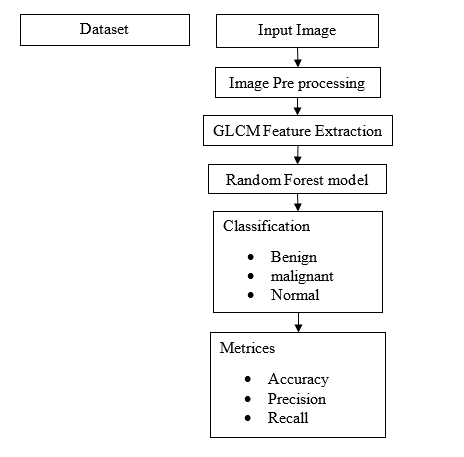
Specifications
Software: Matlab 2020a or above
Hardware:
Operating Systems:
- Windows 10
- Windows 7 Service Pack 1
- Windows Server 2019
- Windows Server 2016
Processors:
Minimum: Any Intel or AMD x86-64 processor
Recommended: Any Intel or AMD x86-64 processor with four logical cores and AVX2 instruction set support
Disk:
Minimum: 2.9 GB of HDD space for MATLAB only, 5-8 GB for a typical installation
Recommended: An SSD is recommended A full installation of all MathWorks products may take up to 29 GB of disk space
RAM:
Minimum: 4 GB
Recommended: 8 GB
Learning Outcomes
· Introduction to Matlab
· What is EISPACK & LINPACK
· How to start with MATLAB
· About Matlab language
· Matlab coding skills
· About tools & libraries
· Application Program Interface in Matlab
· About Matlab desktop
· How to use Matlab editor to create M-Files
· Features of Matlab
· Basics on Matlab
· What is an Image/pixel?
· About image formats
· Introduction to Image Processing
· How digital image is formed
· Importing the image via image acquisition tools
· Analyzing and manipulation of image.
· Phases of image processing:
o Acquisition
o Image enhancement
o Image restoration
o Color image processing
o Image compression
o Morphological processing
o Segmentation etc.,
· How to extend our work to another real time applications
· Project development Skills
o Problem analyzing skills
o Problem solving skills
o Creativity and imaginary skills
o Programming skills
o Deployment
o Testing skills
o Debugging skills
o Project presentation skills
o Thesis writing skills
Demo Video


Request for Video
 Paper Publishing
Request Call Back
Would you like to receive a free callback now?
Choose the best time for callback:
Leave your message and we will contact you as soon as possible

6-2-85/B, Old Maternity Hospital Road, Thyagaraja Nagar, Tirupati, Andhra Pradesh – 517501
+91 9030333433
+91 9393939065
0877-2261612

Disclaimer - Takeoff Edu Group Projects are not associated or affiliated with IEEE in any way. The IEEE Projects mentioned here are mentioned in the context of student projects, whose ideas are derived from IEEE publications, not projects of or by IEEE.

