Objective
The main objective of this system is to control the traffic signals so that the ambulance would be able to cross all the traffic junctions without waiting.
Abstract
Traffic lights play such important role in traffic management to control the traffic on the road. Situation at traffic light area is getting worse especially in the event of emergency cases. During traffic congestion, it is difficult for emergency vehicle to cross the road which involves many junctions. This situation leads to unsafe conditions which may cause accident.
This project is intended to deliver an automatic traffic light controller for emergency Vehicle. The increasing numbers of vehicles not only has a large environmental impact, but also result in loss of lives and time on the road. Besides, there will be huge losses in terms of productivity where it will affect the ability of cities to compete globally. This situation demands a better approach to handle the situation especially for emergency vehicle like ambulance. There is a need to have a system that can control the traffic light signal at junction in case of emergency.
During emergency cases, emergency vehicle like ambulance can trigger the traffic light signal to change from red to green in order to make clearance for its path automatically, the traffic light operation will turn back to normal when the ambulance finishes crossing the road.
Keywords: NodeMCU, Blynk App, traffic light control
NOTE: Without the concern of our team, please don't submit to the college. This Abstract varies based on student requirements.
Block Diagram
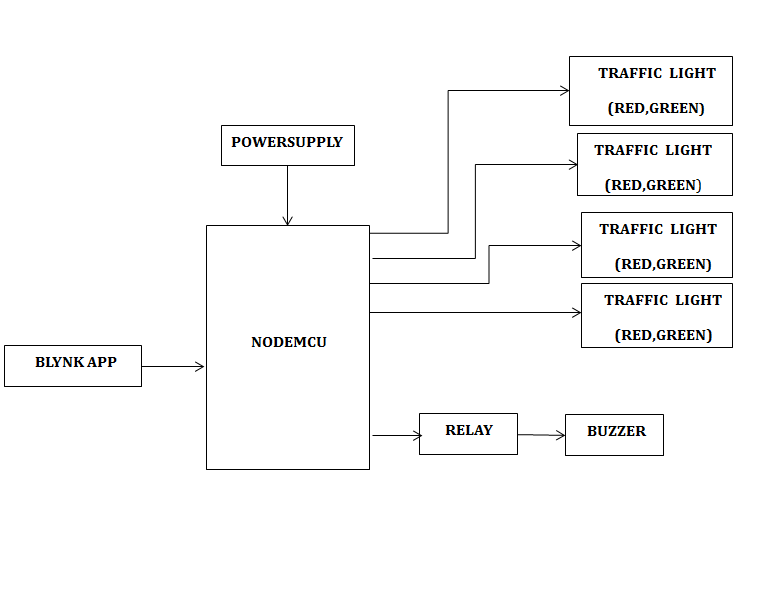
Specifications
Hardware Requirements:
- NodeMCU
- Relay
- Buzzer
- 5V Adapter
- Traffic lights( LEDs)
- Connecting wires
Software Requirements:
- Arduino IDE
- Embedded c
- Blynk app mobile application
- Fritzing
Learning Outcomes
- NodeMCU Pin diagram and Architecture
- How to install Arduino IDE Software
- Setting up and Installation procedures for NodeMCU
- Introduction to Arduino IDE
- Commands in NodeMCU
- Basic coding in Embedded C
- Working of relay
- Interface of relay, buzzer with NodeMCU
- Interface led with NodeMCU
- How to send commands from Blynk App to NodeMCU?
- About Project Development Life Cycle:
- Planning and Requirement Gathering(( software’s, Tools, Hardware components, etc.,)
- Schematic preparation
- Code development and debugging
- Hardware development and debugging
- Development of the Project and Output testing
- Practical exposure to:
- Hardware and software tools.
- Solution providing for real time problems.
- Working with team/ individual.
- Work on Creative ideas.
- Project development Skills
- Problem analyzing skills
- Problem solving skills
- Creativity and imaginary skills
- Programming skills
- Deployment
- Testing skills
- Debugging skills
- Project presentation skills
- Thesis writing skills


 Paper Publishing

Request Call Back
Would you like to receive a free callback now?
Choose the best time for callback:
Leave your message and we will contact you as soon as possible

6-2-85/B, Old Maternity Hospital Road, Thyagaraja Nagar, Tirupati, Andhra Pradesh – 517501
+91 9030333433
+91 9393939065
0877-2261612

Disclaimer - Takeoff Edu Group Projects are not associated or affiliated with IEEE in any way. The IEEE Projects mentioned here are mentioned in the context of student projects, whose ideas are derived from IEEE publications, not projects of or by IEEE.

