IoT-based Restaurant Menu Ordering System using Arduino UNO
Objective
This project demonstrates an IoT-based restaurant menu ordering system utilizing Arduino UNO, streamlining the ordering process, enhancing customer experience, and improving operational efficiency through order management.
Abstract
The implementation of a Smart Restaurant with an E-Menu Card in Smart Cities aims to revolutionize the dining experience by seamlessly connecting customers and chefs through advanced technology. This project utilizes Zigbee communication protocol to interface two Arduinos, one acting as a transmitter with a Nextion display for user input, and the other as a receiver with a 16x2 LCD for the chef's interface. The transmitter Arduino, equipped with a Nextion display, serves as the electronic menu card accessible to customers. Customers can effortlessly browse through the menu, make selections, and send their orders to the kitchen. The intuitive Nextion display facilitates user interaction, enhancing the overall dining experience.
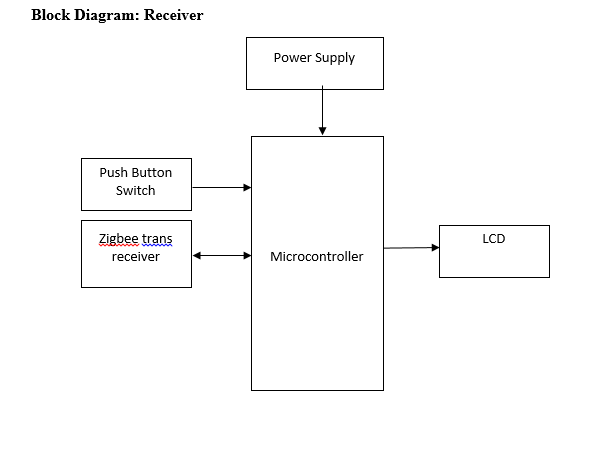
On the receiver side, the chef receives the orders on a 16x2 LCD screen connected to the Arduino. This display provides a clear and concise interface for the chef to view orders in real-time, enabling efficient management of incoming orders and timely meal preparation. The seamless communication between the transmitter and receiver ensures that orders are accurately transmitted, minimizing errors and enhancing operational efficiency. By implementing this Smart Restaurant system, the project aims to enhance customer satisfaction, streamline restaurant operations, and contribute to the development of smart cities. The integration of advanced technology not only modernizes traditional dining experiences but also promotes sustainability by reducing paper waste associated with conventional menu cards. This project represents a step towards the future of dining establishments in smart cities, where technology facilitates seamless interactions between customers and restaurant staff, ultimately enhancing the overall dining experience.NOTE: Without the concern of our team, please don't submit to the college. This Abstract varies based on student requirements.
Block Diagram
Specifications
Hardware Requirements:
- Arduino UNO
- Nextion Display
- Zigbee Transreceivers
- Power Supply
- LCD
Software Requirements:
- Arduino IDE
- Embedded C
Learning Outcomes
- Arduino pin diagram and architecture
- How to install Arduino IDE software
- Setting up and installation procedure for Arduino
- Introduction to Arduino IDE
- Basic coding in Arduino IDE
- Working of LCD
- Interface LCD with Arduino
- Working of power supply
- About Project Development Life Cycle:
- Planning and Requirement Gathering (software’s, Tools, Hardware components, etc.,)
- Schematic preparation
- Code development and debugging
- Hardware development and debugging
- Development of the Project and Output testing
- Practical exposure to:
- Hardware and software tools.
- Solution providing for real time problems.
- Working with team/ individual.
- Work on Creative ideas.
- Project development Skills
- Problem analyzing skills
- Problem solving skills
- Creativity and imaginary skills
- Programming skills
- Deployment
- Testing skills
- Debugging skills
- Project presentation skills


 Paper Publishing

Request Call Back
Would you like to receive a free callback now?
Choose the best time for callback:
Leave your message and we will contact you as soon as possible

6-2-85/B, Old Maternity Hospital Road, Thyagaraja Nagar, Tirupati, Andhra Pradesh – 517501
+91 9030333433
+91 9393939065
0877-2261612

Disclaimer - Takeoff Edu Group Projects are not associated or affiliated with IEEE in any way. The IEEE Projects mentioned here are mentioned in the context of student projects, whose ideas are derived from IEEE publications, not projects of or by IEEE.

