IOT Based Notice Board Using Scrolling Display
Abstract
Notice boards are commonly used in variety of institutions which we come across in a daily basis. In the present generation the advertisement notice boards are being managed manually. This process is difficult to involve in order to put a notice on the notice board. This waste a lot of things like paper printer ink, manpower and also brings the loss of time. In this paper we have proposed a system through wireless transmit notices on a notice board using Wi-Fi. Wi-Fi can pass information for about 100meter distance Wi-Fi data rate has 1 or 2 Mbps. It accesses numerous points and to support network interfaces. It also makes the system compatible with more than one wireless technology our project name is “Digital Wireless Notice Board”. In this wireless technology is used to transmit the notice on to the digital display. In this an authorized user will get the data via personal computer using a client-based server over the Wi-Fi network towards the raspberry pi. Raspberry pi receives the notice and stores it in its memory and then display the data according to the program. The notice can be modified and the required person altered according to client needs.
Keywords: Raspberry Pi, Scrolling Display, Notice Board
NOTE: Without the concern of our team, please don't submit to the college. This Abstract varies based on student requirements.
Block Diagram
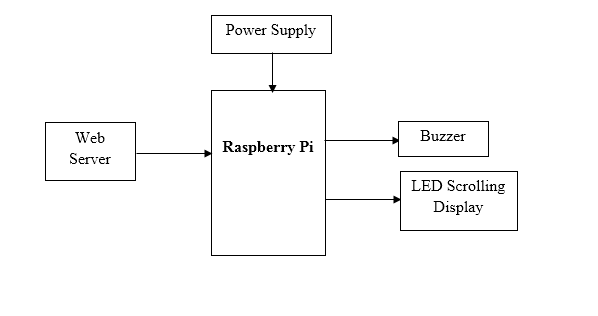
Specifications
Hardware Requirements:
- Raspberry Pi
- Power Supply
- Buzzer
- LED Scrolling Display Matrix
Software requirements:
- Python
- Raspbian OS
- NOOBS
- Web Server
Learning Outcomes
- Raspberry pi pin diagram and architecture
- How to install NOOBS software
- Setting up and installation procedure for Raspberry Pi
- How to connect Raspberry Pi through VNC viewer
- Introduction to Python3 IDE
- Commands in Python
- Basic coding in Python
- How to interface Buzzer with Raspberry Pi?
- How to interface LED Scrolling Display Matrix with Raspberry Pi?
- How to interface Web Server with Raspberry Pi?
- Working on Power supply
- About Project Development Life Cycle:
- Planning and Requirement Gathering (Hardware components, etc.,)
- Hardware development and debugging
- Development of the Project and Output testing
- Practical exposure to:
- Hardware tools.
- Solution providing for real time problems.
- Working with team/ individual.
- Work on Creative ideas.
- Project development Skills
- Problem analyzing skills
- Problem solving skills
- Creativity and imaginary skills
- Testing skills
- presentation skills
- Thesis writing skills


 Paper Publishing

Request Call Back
Would you like to receive a free callback now?
Choose the best time for callback:
Leave your message and we will contact you as soon as possible

6-2-85/B, Old Maternity Hospital Road, Thyagaraja Nagar, Tirupati, Andhra Pradesh – 517501
+91 9030333433
+91 9393939065
0877-2261612

Disclaimer - Takeoff Edu Group Projects are not associated or affiliated with IEEE in any way. The IEEE Projects mentioned here are mentioned in the context of student projects, whose ideas are derived from IEEE publications, not projects of or by IEEE.

