Intelligent Control Shed Poultry Farm System utilizes Arduino and IoT Technology
Objective
This work aims to develop an intelligent poultry farm control system using Arduino and IoT for real-time monitoring and automation. The system enhances efficiency by optimizing environmental conditions and resource management.
Abstract
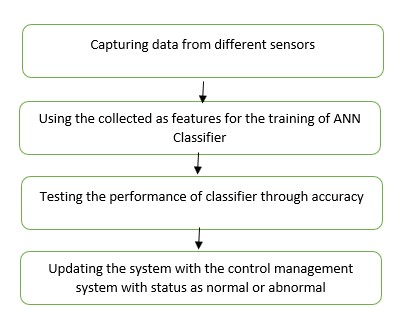
The system monitors temperature and humidity using the DHT11 sensor, air quality through the MQ135 and MQ137 gas sensors, light levels via the LDR sensor, and water supply using the water level sensor. Based on real-time data, the system controls various actuators like a water pump, CPU fan, and bulb using relays to maintain ideal conditions. The NodeMCU enables IoT connectivity for remote monitoring and data logging, while the GSM module sends SMS alerts for critical events. A buzzer provides local alarms, and the LCD display shows status updates, ensuring efficient farm management. We will use the values collected using different sensors for training of Artificial Neural Networks (ANN) and later it will classify the status of the things like normal or abnormal and the abnormal things need an action like reducing or switching off the things.
Keywords: Poultry Farm System, IoT, Efficient Farm Management, Artificial Neural Networks (ANN), Classification.
NOTE: Without the concern of our team, please don't submit to the college. This Abstract varies based on student requirements.
Block Diagram
Specifications
Software requirements:
• MatlabR2022b.
Hardware requirements:
Operating Systems:
• Windows 10
• Windows 7 Service Pack 1
• Windows Server 2019 & 2016.
Processors:
Minimum: Any Intel or AMD x86-64 processor.
Recommended: Any Intel or AMD x86-64 processor with four logical cores and AVX2 instruction set support.
Disk:
Minimum: 2.9 GB of HDD space for MATLAB only, 5-8 GB for a typical installation.
Recommended: An SSD is recommended a full installation of all Math Works products may take up to 29 GB of disk space.
RAM: Minimum 4 GB but recommended 8 GB.
Learning Outcomes
· Introduction to Matlab
· What is EISPACK & LINPACK
· How to start with MATLAB
· About Matlab language
· Matlab coding skills
· About tools & libraries
· Application Program Interface in Matlab
· About Matlab desktop
· How to use Matlab editor to create M-Files
· Features of Matlab
· Basics on Matlab
· What is Communication?
· About Communication
· Introduction to Communication
· How Communication Works?
· Importing the System Design, Characterization and Visualization
· Analyzing of BER tool
· Analyzing of Error Rate Test Console
· Generation of WSN
· WSN network creation
· Nodes Communication
· Clustering
· Routing
· Convolutional
· Equalization and Synchronization etc.,
· How to extend our work to another real time applications
· Project development Skills
o Problem analyzing skills
o Problem solving skills
o Creativity and imaginary skills
o Programming skills
o Deployment
o Testing skills
o Debugging skills
o Project presentation skills
o Thesis writing skills


 Paper Publishing

Request Call Back
Would you like to receive a free callback now?
Choose the best time for callback:
Leave your message and we will contact you as soon as possible

6-2-85/B, Old Maternity Hospital Road, Thyagaraja Nagar, Tirupati, Andhra Pradesh – 517501
+91 9030333433
+91 9393939065
0877-2261612

Disclaimer - Takeoff Edu Group Projects are not associated or affiliated with IEEE in any way. The IEEE Projects mentioned here are mentioned in the context of student projects, whose ideas are derived from IEEE publications, not projects of or by IEEE.

