Hand Gesture Based Home Automation Using Leap Motion
Also Available Domains Embedded applications
Objective
The main objective of this project is to control the electronic appliances by using hand gesture moments which can be helpful for disabled people who cannot walk or for old people who cannot go to switch box to turn the light ON.
Abstract
In this world of abundant intelligent devices, with an aim to help the disabled, elderly and children communicate with the devices directly through gestures instead of the conventional switchboards we propose a system to make human hand tracking and controlling the household appliances possible in real time with minimal latency. The automated system developed until now was limited in the gestures made, not much supportive of the gestures made by the individual fingers and also slow in recognizing and computing the input parameters.
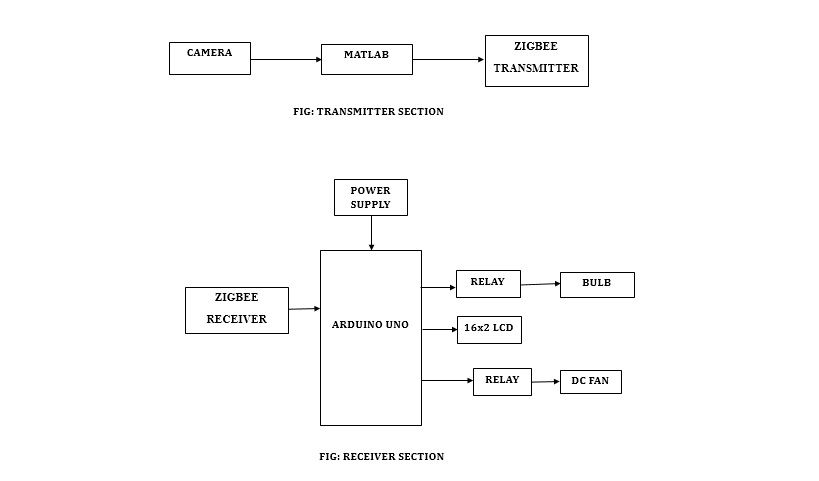
For this purpose, we are using a camera to detect the motion of a human hand to control the electronic devices. With the help of these detected motion, MATLAB will generate control signals for a particular gesture or a hand movement and sends the signals via ZIGBEE. The information that received is been collected and processed by ARDUINO controls the other devices. For example, the user showed an index finger to the camera one signal is generated and sends through ZIGBEE, in the received section the ARDUINO compares the received data with the defined data (signals for various gestures). Based on it the ARDUINO actuates the output whether to ON the fan or the light.
Keywords: Hand gestures, Arduino UNO, MATLAB, Zigbee.
NOTE: Without the concern of our team, please don't submit to the college. This Abstract varies based on student requirements.
Block Diagram
Specifications
Hardware Requirements:
- ARDUINO UNO
- Camera
- USB to serial converter
- USB cable
- Relays
- Bulb
- Fan
- ZIGBEE transmitter and receiver
- 12V Adapter
- Connecting wires
Software Requirements:
- ARDUINO IDE
- Embedded C
- MATLAB
- Fritzing
Learning Outcomes
- Arduino UNO Pin diagram and Architecture
- How to install arduino IDE Software
- Setting up and Installation procedures for Arduino UNO
- Introduction to Arduino IDE
- Introduction to MATLAB
- Installation of MATLAB
- How to interface camera with MATLAB?
- How to identify hand gestures using MATLAB?
- What is Serial communication?
- What is Zigbee?
- How to send signal from MATLAB using Zigbee?
- How to interface zigbee with arduino UNO?
- Working of relay
- How to interface relay with arduino?
- How to interface CPU fan, bulb with arduino?
- About Project Development Life Cycle:
- Planning and Requirement Gathering(( software’s, Tools, Hardware components, etc.,)
- Schematic preparation
- Code development and debugging
- Hardware development and debugging
- Development of the Project and Output testing
- Practical exposure to:
- Hardware and software tools.
- Solution providing for real time problems.
- Working with team/ individual.
- Work on Creative ideas.
- Project development Skills
- Problem analyzing skills
- Problem solving skills
- Creativity and imaginary skills
- Programming skills
- Deployment
- Testing skills
- Debugging skills
- Project presentation skills
- Thesis writing skills


 Paper Publishing

Request Call Back
Would you like to receive a free callback now?
Choose the best time for callback:
Leave your message and we will contact you as soon as possible

6-2-85/B, Old Maternity Hospital Road, Thyagaraja Nagar, Tirupati, Andhra Pradesh – 517501
+91 9030333433
+91 9393939065
0877-2261612

Disclaimer - Takeoff Edu Group Projects are not associated or affiliated with IEEE in any way. The IEEE Projects mentioned here are mentioned in the context of student projects, whose ideas are derived from IEEE publications, not projects of or by IEEE.

