Gesture Vocalizer for Dumb People Using OpenCV, Python
Also Available Domains Raspberry pi
Objective
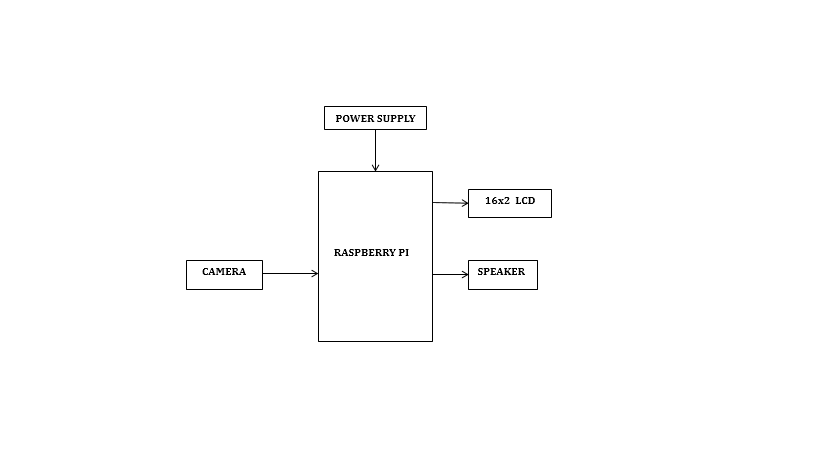
This project proposes a camera-based assistive sign detection and processing some functions to make the speaker to speak using Raspberry Pi. Normally in deaf and dumb schools they are using sign language for their communication, likewise here Raspberry Pi is trained with 6 to 7 Gesture recognitions.
Abstract
The basic idea of this project is to create a Digital vocalizer for social purpose. This project implement a system which can bridge a communication gap between dumb people and others as less as possible. Dumb people make use of sign language or gestures to understand what he/she is trying to say, but it is impossible to understand for us.
Assistive technologies are being developed for deaf and dumb people in order to live confidently. This project proposes a camera-based assistive gesture reading framework to help blind persons to read text labels. Here we are using 6 to 7 sign detection, Functions of each sign can be easily configurable to certain process (ex: For any voice command, asking for some needs or typing any letters, etc.,) using the hand sign which is detected using a camera and sign detection is done using OpenCV.
Keywords: OpenCV, Sign detection, Raspberry Pi.
NOTE: Without the concern of our team, please don't submit to the college. This Abstract varies based on student requirements.
Block Diagram
Specifications
Hardware Requirements:
- Raspberry Pi
- Micro SD card
- 5v Adapter
- Camera
- Speaker
- 16x2 LCD
Software Requirements:
- VNC Viewer
- NOOBS OS
- Python3 IDE
- Fritzing
Learning Outcomes
- Raspberry Pi Pin diagram and Architecture
- How to install NOOBS Software
- Setting up and Installation procedures for Raspberry Pi
- How to connect Raspberry Pi through VNC viewer?
- Introduction to Python3 IDE
- Commands in Python
- Basic coding in Python
- How to install libraries required for camera interfacing?
- How to interface camera with Raspberry Pi?
- How a 16x2 LCD works?
- How to interface LCD display with Raspberry Pi?
- How to interface speakers with Raspberry Pi?
- About Project Development Life Cycle:
- Planning and Requirement Gathering( software’s, Tools, Hardware components, etc.,)
- Schematic preparation
- Code development and debugging
- Hardware development and debugging
- Development of the Project and Output testing
- Practical exposure to:
- Hardware and software tools.
- Solution providing for real time problems.
- Working with team/ individual.
- Work on Creative ideas.
- Project development Skills
- Problem analyzing skills
- Problem solving skills
- Creativity and imaginary skills
- Programming skills
- Deployment
- Testing skills
- Debugging skills
- Project presentation skills
- Thesis writing skills


 Paper Publishing

Request Call Back
Would you like to receive a free callback now?
Choose the best time for callback:
Leave your message and we will contact you as soon as possible

6-2-85/B, Old Maternity Hospital Road, Thyagaraja Nagar, Tirupati, Andhra Pradesh – 517501
+91 9030333433
+91 9393939065
0877-2261612

Disclaimer - Takeoff Edu Group Projects are not associated or affiliated with IEEE in any way. The IEEE Projects mentioned here are mentioned in the context of student projects, whose ideas are derived from IEEE publications, not projects of or by IEEE.

