Enhanced Security Access Control System Using Raspberry Pi Pico W
Objective
To develop a security access system with Raspberry Pi Pico W that provides user authentication, real-time feedback, and remote notifications for unauthorized access attempts.
Abstract
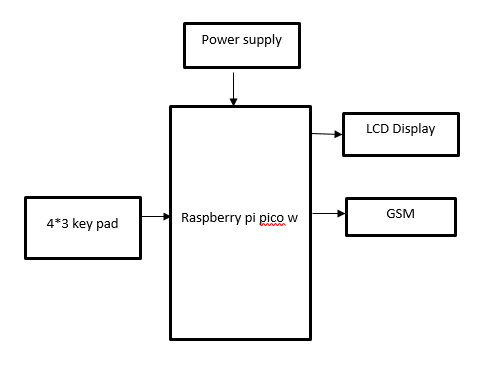
This project involves developing a security access system using a Raspberry Pi Pico W, a 4x3 keypad, an LCD display, and a GSM module to provide robust access control and real-time monitoring. The system authenticates users by comparing input from the keypad to a pre-stored password in the Pico W’s memory. When the correct password is entered, the LCD displays a confirmation message, signaling successful access. Conversely, if an incorrect password is entered, the LCD shows an error message, and the GSM module sends a notification to a designated phone number, alerting the user to a potential security breach. Additionally, the system can be programmed to log access attempts for further review. This setup enhances security by offering immediate feedback to users and remote notifications for unauthorized access attempts, thereby enabling prompt responses to potential security threats. The integration of these components provides a comprehensive solution for managing and monitoring secure access points effectively.
NOTE: Without the concern of our team, please don't submit to the college. This Abstract varies based on student requirements.
Block Diagram
Specifications
Hardware requirements:
- Raspberry pi Pico w
- LCD display
- Key pad
- GSM
Software requirements:
- Thonny IDE
- python
Learning Outcomes
- Raspberry pi Pico w pin diagram and architecture
- How to install Thonny IDE software
- Setting up and installation procedure for Thonny
- Introduction to Thonny IDE
- Basic coding in Thonny IDE
- Working of 4*3 key pad
- Working of LCD
- Interface LCD with raspberry pi Pico w?
- Working of power supply
- About Project Development Life Cycle:
- Planning and Requirement Gathering (software’s, Tools, Hardware components, etc.,)
- Schematic preparation
- Code development and debugging
- Hardware development and debugging
- Development of the Project and Output testing
- Practical exposure to:
- Hardware and software tools.
- Solution providing for real time problems.
- Working with team/ individual.
- Work on Creative ideas.
- Project development Skills
- Problem analyzing skills
- Problem solving skills
- Creativity and imaginary skills
- Programming skills
- Deployment
- Testing skills
- Debugging skills
- Project presentation skills
- Thesis writing skills


 Paper Publishing

Request Call Back
Would you like to receive a free callback now?
Choose the best time for callback:
Leave your message and we will contact you as soon as possible

6-2-85/B, Old Maternity Hospital Road, Thyagaraja Nagar, Tirupati, Andhra Pradesh – 517501
+91 9030333433
+91 9393939065
0877-2261612

Disclaimer - Takeoff Edu Group Projects are not associated or affiliated with IEEE in any way. The IEEE Projects mentioned here are mentioned in the context of student projects, whose ideas are derived from IEEE publications, not projects of or by IEEE.

