Driver Vigilance and Behaviour Monitoring with Automated Alerts using YOLO
Objective
The objective of this system is to monitor driver vigilance and behavior using a YOLO-based computer vision model. It aims to detect signs of drowsiness, distraction, or unsafe actions in real time. The system provides automated alerts to prevent potential accidents. Additionally, it enhances road safety by ensuring continuous driver awareness and timely intervention.
Abstract
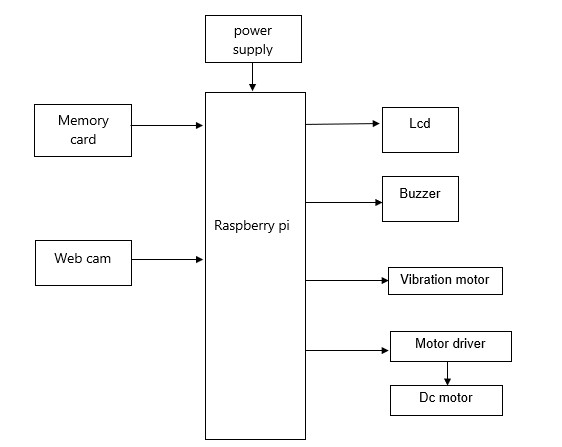
The project titled “Driver Vigilance and Behaviour Monitoring with Automated Alerts using YOLO” aims to enhance road safety by detecting driver drowsiness and unsafe behaviors in real time. This system uses a Raspberry Pi as the central processing unit, integrated with a webcam to continuously monitor the driver’s facial expressions and activities such as drowsiness, mobile usage, and eating while driving. The YOLO (You Only Look Once) algorithm is employed for fast and accurate object detection and behavior analysis.
When abnormal conditions are detected, the system immediately triggers alert mechanisms including a buzzer and vibration motor to warn the driver. An LCD display is used to show system status and alerts. Additionally, a motor driver is used for controlling connected DC motor components if required for extended automation. This system provides a low-cost, efficient, and real-time solution to reduce accidents caused by driver inattention and fatigue.
NOTE: Without the concern of our team, please don't submit to the college. This Abstract varies based on student requirements.
Block Diagram
Specifications
Hardware components:
- Raspberry Pi
- USB Webcam
- LCD Display
- Buzzer
- Vibration Motor
- Motor Driver Module
- DC Motor
- Power Supply Adapter
- USB Cable
- Power Supply
- 12V Adapter
- Connectors – 30
Software components:
- Embedded C
- Arduino IDE
- Python
Learning Outcomes
Learning outcomes:
• Raspberry Pi pin diagram and architecture
• How to install Raspberry Pi OS / setup software
• Setting up and installation procedure for Raspberry Pi
• Introduction to Raspberry Pi development environment
• Basic programming in Raspberry Pi (Python / C / C++)
• Basics of Embedded Python / Raspberry Pi programming
• Basics of IoT platforms
• Working of power supply
• About
Project Development Life Cycle:
• Planning and Requirement Gathering (software, tools, hardware components,
etc.)
• Schematic preparation
• Code development and debugging
• Hardware development and debugging
• Development of the project and output testing
•
Practical exposure to:
• Hardware and software tools
• Solution providing for real-time problems
• Working with team/individual
• Work on creative ideas
• Skills
developed:
• Project development skills
• Problem analyzing skills
• Problem solving skills
• Creativity and imaginative skills
• Programming skills
• Deployment
• Testing skills
• Debugging skills
• Project presentation skills
• Thesis writing skills


 Paper Publishing

Request Call Back
Would you like to receive a free callback now?
Choose the best time for callback:
Leave your message and we will contact you as soon as possible

6-2-85/B, Old Maternity Hospital Road, Thyagaraja Nagar, Tirupati, Andhra Pradesh – 517501
+91 9030333433
+91 9393939065
0877-2261612

Disclaimer - Takeoff Edu Group Projects are not associated or affiliated with IEEE in any way. The IEEE Projects mentioned here are mentioned in the context of student projects, whose ideas are derived from IEEE publications, not projects of or by IEEE.

