Collision Warning With Auto Brake & Complete High Voltage Disconnect During Crash
Abstract
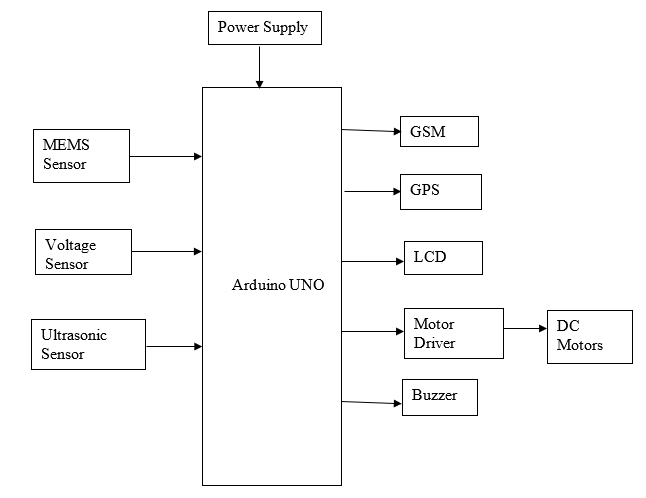
This project presents a smart Collision Warning and Auto-Braking System with complete high-voltage disconnect functionality for enhanced vehicle safety during crashes. Using an Arduino as the central controller, the system integrates a MEMS sensor to detect sudden impacts or collisions, triggering immediate safety responses. An ultrasonic sensor monitors the distance to nearby obstacles, enabling real-time collision warnings and activating the auto-braking mechanism through a motor driver connected to a DC motor. In the event of a crash, the system automatically disconnects high-voltage components to prevent electrical hazards. A GPS module tracks the vehicle's location, while a GSM module sends emergency alerts with location data to predefined contacts. An LCD displays real-time system status and warnings, and a buzzer provides audible alerts to the driver. This intelligent safety framework enhances accident prevention, emergency response, and post-crash safety in modern vehicles.
NOTE: Without the concern of our team, please don't submit to the college. This Abstract varies based on student requirements.
Block Diagram
Specifications
Hardware Requirements:
- Power Supply
- Arduino
- MEMS Sensor
- Voltage Sensor
- Ultrasonic Sensor
- GSM
- GPS
- LCD
- Motor Driver
- DC Motor
- Buzzer
Software Requirements:
- Embedded C
- Arduino IDE
Learning Outcomes
- Arduino pin diagram and architecture
- How to install Arduino IDE software
- Setting up and installation procedure for Arduino
- Introduction to Arduino IDE
- Basic coding in Arduino IDE
- Basic of Embedded C language
- Basics of IoT platforms
- Working of power supply
About Project Development Life Cycle:
- Planning and Requirement Gathering (software’s, Tools, Hardware components, etc.,)
- Schematic preparation
- Code development and debugging
- Hardware development and debugging
- Development of the Project and Output testing
Practical exposure to:
- Hardware and software tools.
- Solution providing for real time problems.
- Working with team/ individual.
- Work on Creative ideas.
Project development Skills
- Problem analysing skills
- Problem solving skills
- Creativity and imaginary skills
- Programming skills
- Deployment
- Testing skills
- Debugging skills
- Project presentation skills
Thesis writing skills


 Paper Publishing

Request Call Back
Would you like to receive a free callback now?
Choose the best time for callback:
Leave your message and we will contact you as soon as possible

6-2-85/B, Old Maternity Hospital Road, Thyagaraja Nagar, Tirupati, Andhra Pradesh – 517501
+91 9030333433
+91 9393939065
0877-2261612

Disclaimer - Takeoff Edu Group Projects are not associated or affiliated with IEEE in any way. The IEEE Projects mentioned here are mentioned in the context of student projects, whose ideas are derived from IEEE publications, not projects of or by IEEE.

