College Website
Objective
This system is based on the convenience of the students to communicate with the resources provided by the college. This project is aimed to provide services to over internet, each student is given to the details about college information like about college, admissions.
Abstract
In this project, we design a web application which allows us to access the total information about the college, staff, students and facilities. This application will maintain the college information, student course details and college event details for the students. In the Earlier system, everyone must go to the college campus to get the information about the college, courses etc. The existing system consumes much time to get any information about the colleges.
We develop a time efficient application named as “College Website System”. By using this application any type of user like student, staff and guest user can login into the system and they can perform their desired action in this application. The proposed system provides high security to the college information including student and staff details.
NOTE: Without the concern of our team, please don't submit to the college. This Abstract varies based on student requirements.
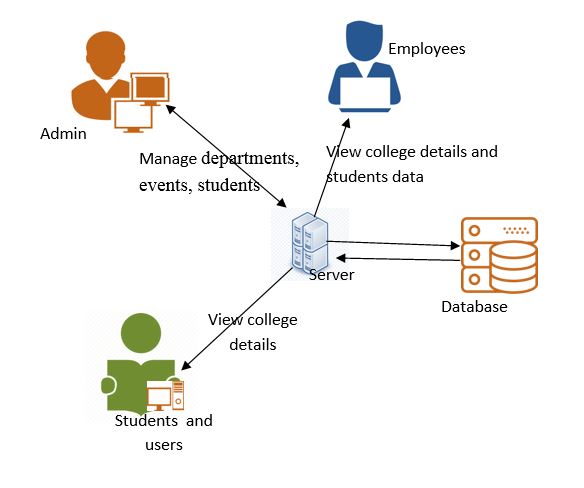
Block Diagram
Specifications
Learning Outcomes
Demo Video


Request for Video
Related Projects
 Paper Publishing
Request Call Back
Would you like to receive a free callback now?
Choose the best time for callback:
Leave your message and we will contact you as soon as possible

6-2-85/B, Old Maternity Hospital Road, Thyagaraja Nagar, Tirupati, Andhra Pradesh – 517501
+91 9030333433
+91 9393939065
0877-2261612

Disclaimer - Takeoff Edu Group Projects are not associated or affiliated with IEEE in any way. The IEEE Projects mentioned here are mentioned in the context of student projects, whose ideas are derived from IEEE publications, not projects of or by IEEE.

