Awake Guard: An Arduino-Based Real-Time System for Enhancing Driver Safety Through Drowsiness Detection
Objective
The Awake Guard system, an Arduino-based solution, enhances driver safety by detecting drowsiness through sensors that monitor eyelid movement and head position. It provides real-time alerts to prevent accidents, aiming to improve road safety, reduce fatigue-related risks, and offer a cost-effective, user-friendly solution for widespread adoption.
Abstract
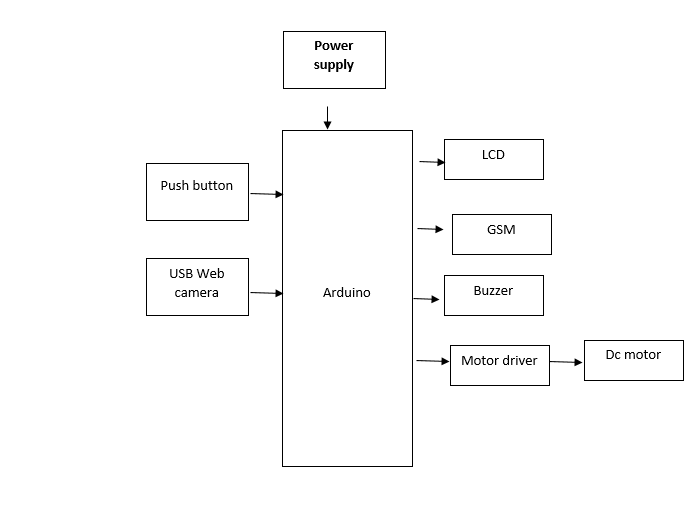
The Awake Guard: An Arduino-Based Real-Time System for Enhancing Driver Safety Through Drowsiness Detection project presents an intelligent safety mechanism designed to prevent accidents caused by driver fatigue. The system integrates a USB web camera to continuously monitor the driver’s facial features and detect signs of drowsiness in real time. When drowsiness is detected, a microcontroller such as the Arduino Uno processes the input and immediately activates safety measures, including stopping the DC motor (simulating vehicle halt), triggering a buzzer alert, displaying a warning message on an LCD, and sending an alert notification via a GSM module. Conversely, when the driver is alert, the system allows normal operation, and the motor continues to run. This real-time detection and response system enhances road safety by providing immediate warnings and preventive actions, making it a cost-effective and efficient solution for reducing fatigue-related accidents and improving driver awareness.
NOTE: Without the concern of our team, please don't submit to the college. This Abstract varies based on student requirements.
Block Diagram

Learning Outcomes
Learning outcomes:
- Arduino Pin diagram and Architecture
- How to install Arduino IDE Software
- Installation of Python IDLE
- Setting up and Installation procedures for Arduino IDE
- Introduction to Arduino IDE
- Commands in Embedded C
- How to install Libraries?
- Basic coding in Embedded C
- Working of Dallas temp
- Working of TDS Sensor
- How to interface Turbidity with Arduino
- How to interface Ph scale with Arduino?
- Working of LCD
- How to interface LCD with Arduino?
- About Project Development Life Cycle:
- Planning and Requirement Gathering (software’s, Tools, Hardware components, etc.,)
- Schematic preparation
- Code development and debugging
- Hardware development and debugging
- Development of the Project and Output testing
- Practical exposure to:
- Hardware and software tools.
- Solution providing for real time problems.
- Working with team/ individual.
- Work on Creative ideas.
- Project development Skills
- Problem analyzing skills
- Problem solving skills
- Creativity and imaginary skills
- Programming skills
- Deployment
- Testing skills
- Debugging skills
- Project presentation skills
- Thesis writing skills
Demo Video


Request for Video
 Paper Publishing
Request Call Back
Would you like to receive a free callback now?
Choose the best time for callback:
Leave your message and we will contact you as soon as possible

6-2-85/B, Old Maternity Hospital Road, Thyagaraja Nagar, Tirupati, Andhra Pradesh – 517501
+91 9030333433
+91 9393939065
0877-2261612

Disclaimer - Takeoff Edu Group Projects are not associated or affiliated with IEEE in any way. The IEEE Projects mentioned here are mentioned in the context of student projects, whose ideas are derived from IEEE publications, not projects of or by IEEE.

