Automatic Pet Feeding System Using Google Assistant and Node MCU
Objective
The main objective of this project is to create a system for feeding pet with Google Assistant with Node MCU controller
Abstract
Pet owners these days want to enjoy the company with their pets, some pet owners have the time to feed their pets and some do not have the time to do so. To overcome this situation automation and (IoT) comes into existence to develop a system that can fulfil the pet owner requirement without doing any harm to their pets. Google assistant controlled automated pet feeder machine is simple, efficient and also cost effective. Using this machine pet owners can feed their pet by Google Assistant which is inbuilt on most of the Android Smartphone from anywhere around the world. Still, people who have a fairly busy schedule in terms of work will have difficulty maintaining ornamental pets, especially when leaving the house in a short time. The purpose of this study is to design a tool that can help the community in terms of scheduling feeding times and automatic water changes in the aquarium and being able to monitor the condition of the aquarium in real-time via an Android smartphone by utilizing the Internet of Things (IoT) technology. This Automatic pet feeder uses a NODEMCU and Arduino Micro Controller and consists of an interface with DC servo motor, relays, water pump and other hardware equipment. A software code is dumped into the micro controller to perform operations like rotating motors and switching relays on and off. The whole feeder system is controlled using a mobile phone installed with Adafruit software. The user sends signals to the micro controller using Google application through Adafruit cloud. When the DC servo motor runs.
NOTE: Without the concern of our team, please don't submit to the college. This Abstract varies based on student requirements.
Block Diagram
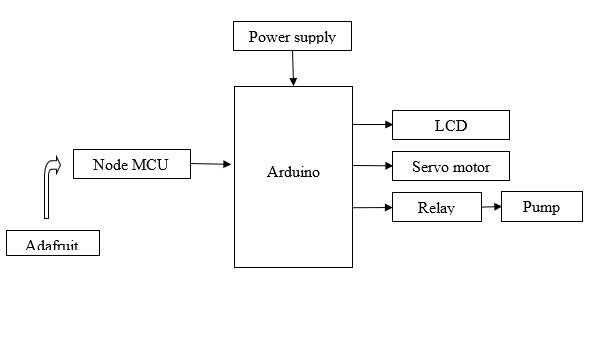
Specifications
Hardware requirements:
· Arduino
· LCD
· Node MCU
· Power supply
· Servo motor
· Dc pump
· Relay
Software requirements:
· Arduino IDE
· Embedded C
Learning Outcomes
- Interfacing of Arduino
- Interfacing of Node MCU
- Arduino pin diagram and architecture
- How to install Arduino IDE software
- Setting up and installation procedure for Arduino
- Introduction to Arduino IDE
- Basic coding in Arduino IDE
- Interfacing on LCD on Arduino?
- Working on servo motor
- Interfacing on servo motor on Arduino
- Working on relay
- Working of dc pump
- Working of power supply
- About Project Development Life Cycle:
- Planning and Requirement Gathering (software’s, Tools, Hardware components, etc.,)
- Schematic preparation
- Code development and debugging
- Hardware development and debugging
- Development of the Project and Output testing
- Practical exposure to:
- Hardware and software tools.
- Solution providing for real time problems.
- Working with team/ individual.
- Work on Creative ideas.
- Project development Skills
- Problem analyzing skills
- Problem solving skills
- Creativity and imaginary skills
- Programming skills
- Deployment
- Testing skills
- Debugging skills
- Project presentation skills
- Thesis writing skills


 Paper Publishing

Request Call Back
Would you like to receive a free callback now?
Choose the best time for callback:
Leave your message and we will contact you as soon as possible

6-2-85/B, Old Maternity Hospital Road, Thyagaraja Nagar, Tirupati, Andhra Pradesh – 517501
+91 9030333433
+91 9393939065
0877-2261612

Disclaimer - Takeoff Edu Group Projects are not associated or affiliated with IEEE in any way. The IEEE Projects mentioned here are mentioned in the context of student projects, whose ideas are derived from IEEE publications, not projects of or by IEEE.

