Automatic Barricade System in Railways
Abstract
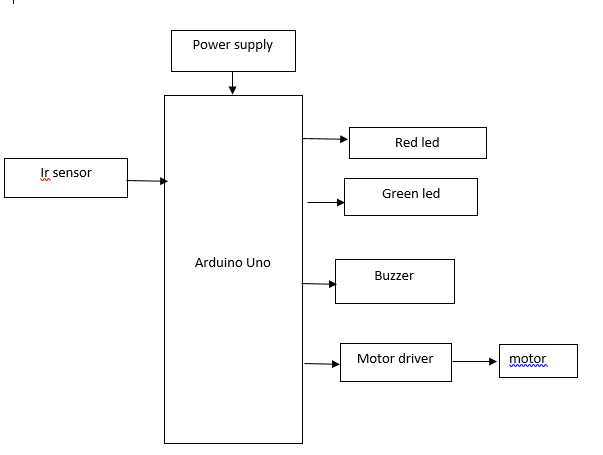
The increasing number of accidents at unmanned railway crossings presents a critical challenge to public safety. This project proposes an Automatic Barricade System in Railways using an Arduino Uno microcontroller, designed to minimize human intervention and ensure timely gate operations. The system utilizes two Infrared (IR) sensors placed at a calculated distance before and after the railway track to detect the presence and movement of a train. Upon detecting an approaching train through the first IR sensor, the Arduino activates a DC motor to automatically lower the barricades on both sides of the track. Simultaneously, a red warning light and a buzzer are triggered to alert nearby vehicles and pedestrians. Once the train passes the second IR sensor, indicating it has cleared the crossing, the system deactivates the warning signals, and the motor raises the barricades, with the green light turning on to signal safe passage. This system enhances safety at railway crossings, especially in rural or unmanned locations, offering a cost-effective and reliable automation solution.
Keywords: Automatic Barricade System, Arduino UNO.
NOTE: Without the concern of our team, please don't submit to the college. This Abstract varies based on student requirements.
Block Diagram
Specifications
Hardware components:
· Arduino uno
· Ir sensor
· Red led
· Green led
· Buzzer
· Motor driver
· Dc Motor
Software components:
· Arduino IDE
· Embedded c
Learning Outcomes
- Understand the Arduino uno microcontroller pin diagram and architecture.
- Learn how to install and set up the necessary development environment for Arduino uno.
- Get acquainted with software tools for Arduino uno programming.
- Develop basic coding skills for the Arduino uno microcontroller.
- Explore the functionality of ir sensor.
- Learn about the power supply requirements for the Arduino and connected components.
- About Project Development Life Cycle:
- Planning and Requirement Gathering( software’s, Tools, Hardware components, etc.,)
- Schematic preparation
- Code development and debugging
- Hardware development and debugging
- Development of the Project and Output testing
- Practical exposure to:
- Hardware and software tools.
- Solution providing for real time problems.
- Working with team/ individual.
- Work on Creative ideas.
- Project development Skills
- Problem analyzing skills
- Problem solving skills
- Creativity and imaginary skills
- Programming skills
- Deployment
- Testing skills
- Debugging skills
- Project presentation skills
- Thesis writing skills
Demo Video


Request for Video
 Paper Publishing
Request Call Back
Would you like to receive a free callback now?
Choose the best time for callback:
Leave your message and we will contact you as soon as possible

6-2-85/B, Old Maternity Hospital Road, Thyagaraja Nagar, Tirupati, Andhra Pradesh – 517501
+91 9030333433
+91 9393939065
0877-2261612

Disclaimer - Takeoff Edu Group Projects are not associated or affiliated with IEEE in any way. The IEEE Projects mentioned here are mentioned in the context of student projects, whose ideas are derived from IEEE publications, not projects of or by IEEE.

