A Microcontroller-based Intelligent Shopping Cart with Automated Navigation and Real-Time Billing
Objective
To develop an intelligent shopping cart with automated navigation and real-time billing features. The system aims to enhance customer convenience and shopping efficiency.
Abstract
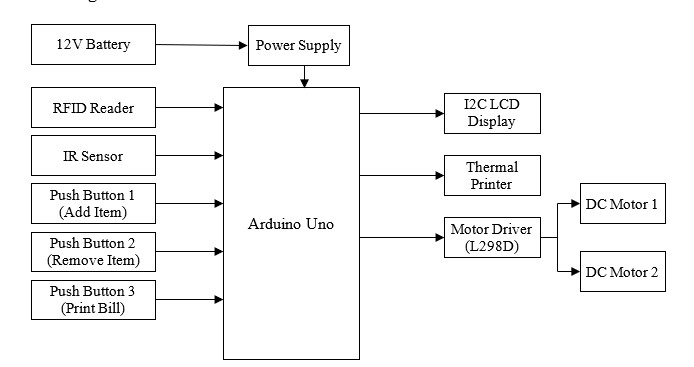
The Microcontroller-based Intelligent Shopping Cart with Automated Navigation and Real-Time Billing is a prototype designed to simplify the shopping experience through automated item tracking, budget monitoring, autonomous customer following, and bill generation. The prototype uses an Arduino Uno as the main controller to manage all hardware components. An EM18 RFID reader scans the RFID tags attached to shopping items, and three push buttons are used to add an item, remove an item, and print the final bill. The Arduino updates the shopping list, item quantity, total bill, and remaining budget, which are displayed in real time on an I2C LCD. The cart is built on a robot chassis with wheels and dummy shafts and moves using two DC motors controlled through an L298D motor driver. An IR sensor detects the presence of the customer, and the Arduino controls the motors so that the cart follows the customer and stops when the customer stops. A thermal printer prints the receipt at the end of shopping. The system is powered by a 12V battery through a regulated power supply and a slide switch. This prototype reduces billing time and improves customer convenience in retail environments.
NOTE: Without the concern of our team, please don't submit to the college. This Abstract varies based on student requirements.
Block Diagram
Specifications
Hardware components:
- Arduino Uno – 1
- RFID Reader (EM18) – 1
- RFID Tags – 5
- I2C LCD Display – 1
- IR Sensor – 1
- DC Motors – 2
- Motor Driver Module (L298D) – 1
- Thermal Printer – 1
- Push Buttons – 3
- 12V Battery – 1
- Slide Switch – 1
- Wheels – 4
- Robot Chassis – 1
- Dummy Shafts – 2
- Power Supply – 1
- Connectors – 20
Software requirements:
- Arduino IDE
Learning Outcomes
- Arduino pin diagram and architecture
- How to install Arduino IDE / setup software
- Setting up and installation procedure for Arduino
- Introduction to Arduino IDE / development environment
- Basic programming in Arduino (Embedded C / C / C++)
- Basics of Embedded C / Arduino programming
- Basics of IoT platforms
- Working of power supply
- About Project Development Life Cycle:
- Planning and Requirement Gathering (software, tools, hardware components, etc.)
- Schematic preparation
- Code development and debugging
- Hardware development and debugging
- Development of the project and output testing
- Practical exposure to:
- Hardware and software tools
- Solution providing for real-time problems
- Working with team/individual
- Work on creative ideas
- Skills developed:
- Project development skills
- Problem analyzing skills
- Problem solving skills
- Creativity and imaginative skills
- Programming skills
- Deployment
- Testing skills
- Debugging skills
- Project presentation skills
- Thesis writing skills


 Paper Publishing


Request Call Back
Would you like to receive a free callback now?
Choose the best time for callback:
Leave your message and we will contact you as soon as possible

6-2-85/B, Old Maternity Hospital Road, Thyagaraja Nagar, Tirupati, Andhra Pradesh – 517501
+91 9030333433
+91 9393939065
0877-2261612

Disclaimer - Takeoff Edu Group Projects are not associated or affiliated with IEEE in any way. The IEEE Projects mentioned here are mentioned in the context of student projects, whose ideas are derived from IEEE publications, not projects of or by IEEE.